Loyalty program integration means connecting your rewards software to the systems where customers already buy and where you already keep their records: your online store, your point of sale (POS), your CRM and your email or SMS tool. Done well, a customer earns points at the register or at checkout, sees the same balance everywhere, and you see one combined picture of what they buy. Done badly, you get duplicate profiles, missing points and a staff member apologizing at the counter.
This guide walks through what to connect, how the data should flow, what to check before you pick a tool, how Shopify loyalty apps fit in, and how to test the whole thing before customers touch it.
Key takeaways
- Integration is about data moving automatically between your loyalty tool and your store, POS, CRM and marketing tools, so members can earn and redeem anywhere you sell.
- Decide your goal and your “system of record” for customer data first. The software choice follows from that, not the other way around.
- Every extra connection adds cost, testing and maintenance, so start with store plus loyalty, then add email, SMS and analytics.
- Test refunds, returns, duplicate customers and outages before launch, not just the happy path of a single purchase.
- Launch with simple earning rules and a few measurable numbers, then adjust from what customers actually do.
Table of Contents
- What loyalty program integration actually is
- What you can connect, and what each connection does
- Four ways to connect the pieces
- Shopify loyalty apps: how they work
- How to choose: what to check before you commit
- Step by step: implementing the integration
- Testing and maintaining it so the numbers stay right
- Reward ideas your integration can support
- Our perspective: keep the first version boring
- Getting the integration built
- FAQ
- Sources
What loyalty program integration actually is
A loyalty program on its own is a list of members and a points balance. An integrated one is wired into your business. Aziro describes it as connecting loyalty-management software with business applications so customer, transaction, points, tier and redemption data move between them automatically.
In practice, the flow looks like this: a purchase happens in your POS or online store, the system sends the eligible transaction to the loyalty platform, the platform calculates points and updates the balance, and your CRM and marketing tools can then use that information to segment customers and personalize messages, subject to consent and your data policies.
Yotpo’s guide names three marks of a real integration: real-time data synchronization, automated workflow triggers, and a consistent interface so loyalty feels like part of your existing customer experience rather than a separate site customers must visit.
Why a small business would bother
Brandmovers lists the practical payoffs: convenience at checkout, a single view of each member, less manual work, and the ability to measure what the program changes. For a shop with a few hundred repeat customers, the manual-work point is usually the one that decides it. If someone on your team is adding points from a spreadsheet, the program will quietly fail the first busy week.
What you can connect, and what each connection does
Not every business needs every connection. Here is what each one gives you.
| System | What it sends or receives | What it gets you |
|---|---|---|
| Online store | Orders, customer accounts, discounts used | Points earned at checkout, rewards redeemed in the cart |
| POS | In-person purchases, customer lookups | One balance across the register and the website |
| CRM | Profiles, purchase history, loyalty tier | Segments, follow-ups, support with context |
| Email and SMS | Tier changes, balance, reward eligibility | Automated welcome, “you’re close to a reward” and win-back messages |
| Analytics | Redemptions, member revenue, repeat rate | Proof the program pays for itself |
The transactional data matters most. Antavo’s developer documentation explains that ecommerce and POS integrations supply details such as purchase amount, products and date and time so rewards can be calculated accurately, and that this data may arrive through direct integrations or through central middleware.
If your CRM is the piece you are missing, our walkthrough on connecting your website forms to a CRM covers the groundwork, because loyalty data is only as good as the customer records it attaches to.
Four ways to connect the pieces
Brandmovers lists prebuilt connectors, real-time APIs, scheduled batch transfers, single sign-on and receipt upload as the common methods, chosen by how fast you need data to move and what your systems can do. For a small business, that boils down to this:
- Prebuilt connector or app. The fastest route. If your store platform and loyalty tool already work together, you install, configure and test. Most small shops should start here.
- API. Shopify’s article on loyalty APIs says APIs can connect ecommerce, POS, CRM and marketing systems to award points, synchronize balances and redemptions, trigger referrals and update customer profiles. This is the route when no connector fits your setup.
- Batch feed. Data moves on a schedule, say nightly. It is simple and cheap, but a customer may not see points until the next day, which is fine for some businesses and frustrating for others.
- Middleware. A layer between systems that translates and routes data. Useful when you have three or more tools and do not want a tangle of one-to-one links.
Onboarding a customer is a good example of the details involved. In the Twilio Segment and Voucherify recipe, enrollment can run on an Identify call for a signup form, or on a Track call when membership follows an action such as a purchase. Either call can create or update the loyalty profile, assign a loyalty card and award welcome points. Whether you are a developer or not, the question to ask a vendor is the same: what event enrolls a customer, and what happens if that customer already exists?
Shopify loyalty apps: how they work
If your store runs on Shopify, a loyalty app is usually the quickest integration you can make. The apps live inside the platform and plug into the storefront, checkout, customer accounts and POS.
Shopify’s help documentation says app extensions can add loyalty functionality to the online store, checkout, customer accounts or POS, while app functions can customize backend operations such as discounts. You manage both from Settings > Apps in your admin.
The core customer cycle, as Shopify describes it for POS, has four steps: enrollment by adding a customer to the sale, automatic point earning after purchase, balance tracking through the customer profile and the loyalty app, and redemption as a reward in the cart.
Installing one for in-person sales
If you also sell in a physical location, Shopify’s POS app guide gives the steps. In your admin, go to Settings > Apps > Shopify App Store, filter for Works with Shopify POS, and install the app. Then add it as a tile on the POS smart grid through Sales channels > Point of Sale > Edit for POS app. That last step matters more than it sounds: if the loyalty tile is buried, staff will skip it, and members will not earn points.
Automating with Shopify Flow
Shopify says Flow can automate loyalty workflows from customer and loyalty events, such as adding or deducting points and reacting to tier changes or reward eligibility. A simple example: when a customer reaches a new tier, Flow can tag the profile so your email tool sends a congratulation message.
What the apps cost
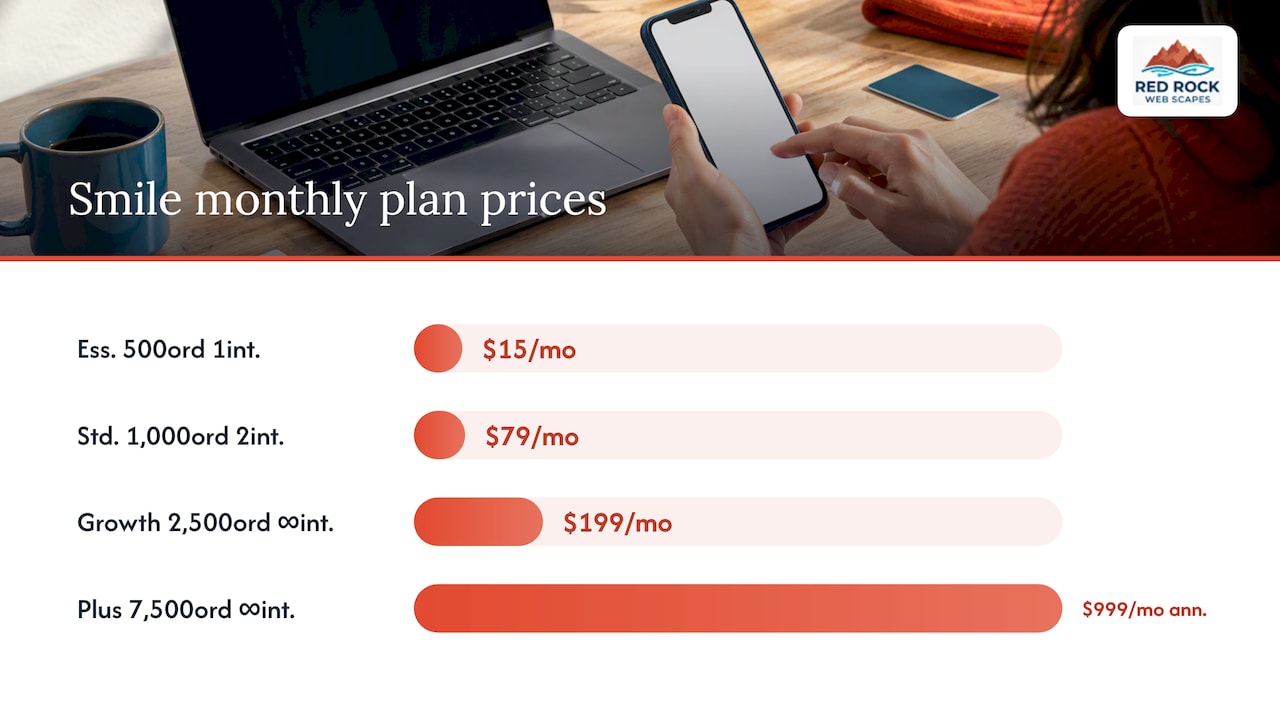
Pricing varies by order volume. Smile’s pricing page, as reviewed in September 2026, lists a free plan for up to 200 monthly orders, Essential at $15 per month for 500 orders, Standard at $79 per month for 1,000, Growth at $199 per month for 2,500, and Smile Plus at $999 per month billed annually for 7,500 orders. The same page shows integration allowances rising by plan: Essential includes one integration, Standard two, and the higher plans unlimited. That is a useful reminder that the connections you want can decide which plan you need.
For a wider range, Shopify estimates a small POS loyalty program at $0 to $200 per month before reward costs, with advanced plans reaching about $1,000 per month. Reward costs, meaning the discounts and free items you give away, come on top and are often the larger number.
If you do not run Shopify, the same logic applies. Square’s Loyalty software, for example, supports points by visits, amount spent or specific items, dollar-off or free-item rewards, text notifications, Apple Wallet passes and VIP tiers. It is a good model of what a small business can reasonably expect from a bundled system.
How to choose: what to check before you commit
The sales page will tell you a tool “integrates with” your platform. That is not enough. Before you sign up, work through these questions.
- Compatibility. Does it connect to your exact store platform and POS, and does it use a maintained connector or a workaround?
- Fields and identifiers. Brandmovers recommends mapping member ID, email, purchase amount, product and date. If a customer uses a different email in store than online, can the system match them?
- System of record. Decide which tool holds the “true” customer record. When two systems disagree, one must win.
- Real-time or batch. Can a customer redeem points minutes after earning them, or only tomorrow?
- Refunds and cancellations. If an order is returned, do the points come back out?
- Outage recovery. If the connection drops for an hour, are missed transactions replayed or lost?
- Data ownership. Can you export your members and balances if you leave?
- Total cost. The same Brandmovers guide warns that each added connection brings cost, testing and maintenance. Count the app fee, any connector or middleware fee, and the hours it takes to maintain.
One more point from Authic’s integration checklist: business value depends on translating every earning, redemption, tier, expiry and eligibility rule accurately, and on validating the reports, not just on confirming that an API connection responds. A connection that “works” can still give the wrong number of points.
Step by step: implementing the integration
- Write down the goal and the scope. Pick one or two measurable aims, such as repeat purchase rate or redemption rate. Nector’s setup guide recommends starting with measurable goals and then choosing a platform with suitable rules and an ecommerce integration.
- Map your data. List where customers, orders, and email consent live today, and which fields must move between systems.
- Design simple rules. One way to earn, one or two rewards, perhaps a single tier. Complexity can come later.
- Connect store and POS first. Purchase events are the foundation. Add the CRM next, then email, SMS and analytics.
- Put the balance where customers look. Nector suggests showing balances on account pages and in the cart, and connecting CRM and email triggers.
- Test, then roll out small. See the next section.
- Measure and adjust. Track repeat purchase rate, redemption rate, incremental member revenue and referral conversion, and change the rules based on what you see.
If you are launching a new store at the same time, build the loyalty hooks into the plan from the start. Our ecommerce launch checklist covers the compliance and speed basics that should be in place before you add a rewards layer, and a faster checkout helps points get earned in the first place; see our notes on raising a small store’s conversion rate.
Testing and maintaining it so the numbers stay right
The riskiest part of a loyalty integration is not setup. It is the quiet drift afterward, when points stop matching purchases and nobody notices until a customer complains.
Open Loyalty’s testing guide recommends testing on a staging environment with recognizable test members, and covering functional, failure and retry, webhook, performance, migration and business-acceptance scenarios. It also advises reconciling missed webhook events and migrated data, and recording sign-off for each customer journey.
For the technically inclined, Open Loyalty’s architecture checklist recommends stable, deterministic IDs for retryable writes, exponential backoff for 429 and 5xx responses and timeouts, logging failed payloads, idempotent webhook consumers, and keeping earning, eligibility and limit rules in the loyalty platform. In plain words: a retry must never award points twice, and the rules should live in one place.
A practical test list for a small shop:
- Buy something as a new member and confirm enrollment and points.
- Buy as an existing member using a different email and see whether a duplicate appears.
- Redeem a reward, then refund the order, and check the balance.
- Change a profile detail and check it reaches the CRM.
- Switch the connection off briefly and check that missed orders catch up.
- Run it at a busy time, or simulate one.
After go-live, Voucherify’s production guide recommends a controlled live sanity test covering enrollment, earning, reward discovery, redemption and balances, plus monitoring endpoint errors and reconciling memberships, points, spending, reward purchases and rejected transactions daily. A small business can scale that down to a weekly check of a handful of real orders against member balances.
Reward ideas your integration can support
Once the plumbing works, the customer experience is where the program earns its keep. Based on what Square lists, a small business can offer:
- Points by visit, by amount spent or by item or category.
- Dollar-off or free-item rewards.
- Automated text notifications when points are earned.
- Redemption in store or online.
- A loyalty pass in Apple Wallet.
- VIP tiers.
Cross-channel setups are also possible. DoorDash’s merchant page describes a restaurant flow where a customer joins on DoorDash, receives an automated welcome email and text, and is encouraged to order directly through the restaurant’s own website or app, with reporting by channel. The lesson applies beyond restaurants: use the loyalty program to move customers toward the channel where you keep the margin and the relationship.
Our perspective: keep the first version boring
We build and manage small business and ecommerce sites, and the pattern we see is that loyalty projects fail from ambition, not from technology. A store wants three tiers, referrals, birthday rewards and SMS on day one, and then the integration becomes the project instead of the sales it was supposed to drive.
Our advice is to treat the loyalty program as part of the website, not an add-on bolted to it. The store, the customer accounts, the email tool and the loyalty app should be planned together, because the customer sees one business. We combine traditional design experience with AI-assisted development so the connecting work moves faster, but the principle does not change: one clear earning rule, one reward, one place where customer data lives, and a test plan that includes refunds. Add the clever parts once the plain version has proven that customers use it.
— George
Getting the integration built
If your store needs to be built or rebuilt around a loyalty program, we can scope it as part of the site. Our ecommerce packages start at $2,500 for Brick & Mortar, $3,500 for E-Tail and $4,000 for Dropshipping (one-off, prices listed as “from”). If you would rather start light, the Website Launchpad program has a $150 one-off setup fee for an ecommerce store build, with managed care plans at $79, $149 and $199 per month for ongoing support. If you need a custom rewards app or portal, see our app design and development services.
FAQ
What is the difference between a loyalty program and a loyalty program integration?
The loyalty program is the offer: how customers earn and what they get. The integration is the technical connection that lets your store, POS, CRM and email tools share purchase and member data automatically. Without it, someone has to enter points by hand, and customers see inconsistent balances.
Do I need a developer to integrate a loyalty program?
Not always. If your loyalty tool has a prebuilt connector for your store platform, such as a Shopify app, setup is mostly configuration and testing. You need a developer when you must use an API or middleware to link systems that have no ready connector, or when you want custom rules.
How much does a loyalty integration cost?
It depends on order volume and the number of connections. Shopify estimates a small POS loyalty program at $0 to $200 per month before reward costs, and one app, Smile, lists plans from free up to $999 per month billed annually. Add reward costs and any setup or maintenance work.
How do I know the integration is working correctly?
Compare a sample of real orders against member balances on a regular schedule, and check that refunds remove points and that no duplicate profiles appear. Watch your redemption rate and repeat purchase rate as well. If those numbers look odd, the rules or the data flow may be wrong.
Sources
- Aziro: Loyalty Program Integration with CRM Systems
- Yotpo: How To Integrate Loyalty Rewards Software
- Brandmovers: Loyalty Program Integration, What to Connect and How
- Antavo: Integration concepts
- Shopify: What Is Loyalty API?
- Twilio: Loyalty Program with Voucherify and Segment
- Shopify Help Center: App extensions and functions
- Shopify: POS Loyalty Programs
- Shopify Help Center: Managing your POS Apps
- Smile.io Pricing and Plans
- Square Loyalty
- Authic: Integration Checklist for White Label Loyalty Platforms
- Nector: Integrated Loyalty Systems Setup Guide
- Open Loyalty: Testing and UAT
- Open Loyalty: Integration Architecture
- Voucherify: Take loyalty v2 to production
- DoorDash: Cross-channel loyalty