
Hotjar remains the best overall pick for small product teams that want click, scroll, and movement heatmaps alongside session recordings in one simple setup. Microsoft Clarity is the strongest free option, Quantum Metric and Glassbox lead for enterprise and regulated industries, and Mouseflow and FullStory suit UX teams that need deep session replay and segmentation. Pair any of these with server-side tracking and consent wiring to keep recordings compliant.
Key Takeaways
For small product teams, Hotjar offers the best all-in-one heatmap and session recording solution, especially when paired with proper consent and data handling practices.
| Point | Details |
|---|---|
| Choose the right heatmap type | Select click, scroll, or movement heatmaps based on your site’s primary user interactions and page structure. |
| Prioritize session replay features | Ensure the tool provides detailed, privacy-compliant session recordings to understand the ‘why’ behind user behavior. |
| Implement proper consent and redaction | Collect explicit opt-in consent before recordings and configure redaction to protect sensitive user data. |
| Start with a small, targeted pilot | Test the tool on a high-traffic page for 30 days, monitor KPIs, and compare results with existing analytics. |
| Use Redrockwebscapes for setup support | We help ensure proper implementation of tracking, consent, and redaction to maximize trust and data quality. |
Table of Contents
- Top Heatmap Tools at a Glance
- How to Choose the Right Heatmap Tool for Your Site
- A Closer Look at the Leading Heatmap Platforms
- What Heatmap Tools Actually Cost
- Privacy, Consent, and Session Replay Risk
- Which Heatmap Tool Should You Actually Start With?
- What I’ve Learned Watching Small Business Sites Run Heatmaps
- Need Help Wiring Up Heatmaps the Right Way?
- FAQ
- Sources
Top Heatmap Tools at a Glance
Before picking a tool, it helps to see how the leading options split by use case. Most teams land on one of these for a first trial, then narrow down based on budget, privacy needs, and how deep the session replay has to go.
- Hotjar: best for small product teams and conversion specialists; offers a free plan plus paid tiers.
- Microsoft Clarity: best for zero-budget projects; completely free with unlimited sessions.
- Crazy Egg: best for marketers who want visual heatmaps paired with A/B test overlays; paid plans with a trial.
- Quantum Metric: best for large organizations tying behavior to revenue KPIs; enterprise pricing only.
- Glassbox: best for regulated enterprises needing high-fidelity mobile and web replay; enterprise pricing only.
- Mouseflow: best for UX researchers who need session replay with segmentation; free tier plus paid plans.
- FullStory: best for product teams that want event-level analytics alongside replay; paid plans with a trial.
- Smartlook: best for teams tracking mobile app and web behavior in the same dashboard; free tier available.
Whatever you pick, prioritize how the tool handles session replay before you look at the heatmap colors. Session replay is treated by regulators as a form of behavioral monitoring that typically calls for explicit opt-in consent rather than a quiet default-on setting, and authorities point to shorter data retention windows as more defensible than the 12-month defaults many vendors ship with.
Beyond the leading options, a handful of specialists round out the field depending on your stack. Plerdy and Zoho PageSense bundle heatmaps with on-page surveys or CRM integrations if you’re already inside that ecosystem. VWO Insights makes the most sense when heatmaps feed directly into an existing experimentation program. UXCam and LiveSession lean toward mobile-first and lightweight web tracking respectively, and Sprig focuses on in-product feedback paired with lighter behavioral signals rather than full heatmap suites.
The free-versus-paid line matters more than it looks. A free tier like Clarity’s is genuinely unlimited, not a crippled trial, which makes it a reasonable permanent choice for a small site. Paid tools generally gate you by monthly sessions or pageviews, so the real cost conversation starts once your traffic grows past what a trial covers.
How to Choose the Right Heatmap Tool for Your Site
Picking a heatmap tool comes down to matching your needs: what you need to see, how much session detail you can responsibly store, and whether the tool fits into the stack you already run.
Start with the type of heatmap you actually need. Click heatmaps show where visitors tap or click, which is the fastest way to confirm whether a call-to-action button is visible and being used. Scroll heatmaps reveal how far down a page people get before they give up, useful for deciding where to put your most important content on long pages. Movement heatmaps track cursor motion and are the weakest signal of the three on mobile-heavy sites, since there’s no mouse to move, but they still help on desktop-first dashboards or SaaS products.
Session recordings add the “why” behind the heatmap’s “what.” The tradeoffs are sampling, storage, and redaction. Recording every single session is expensive and often unnecessary: a sample of a few hundred sessions on your highest-traffic pages usually surfaces the same friction points as recording everything. Redaction settings, which mask form fields, passwords, and other sensitive inputs before a recording is stored, are not uniformly reliable across vendors, and manual reviews have found severe personal data leaks even when redaction was supposedly active.
Integration fit is the next filter. Check whether the tool connects cleanly to your analytics platform (commonly Google Analytics), your tag manager, and any A/B testing software you already run or plan to adopt. A heatmap tool that can’t share data with your experimentation platform forces you to manually cross-reference two dashboards, which slows down every decision.
Run a short pilot before committing to an annual plan:
- Pick one high-traffic page (a landing page or product page works best).
- Set a two to four week recording window with a defined session cap.
- Track one or two KPIs, such as scroll depth past the fold or click-through on the primary call to action.
- Compare the heatmap findings against your existing analytics baseline before changing anything.
Pro Tip: Run your pilot on a page you’re already planning to redesign, so the heatmap data has an immediate use instead of sitting in a report nobody acts on.
A Closer Look at the Leading Heatmap Platforms
Each of the tools below covers the core heatmap types (click, scroll, movement) to varying degrees, but they differ sharply in session replay depth, privacy controls, and who they’re actually built for.
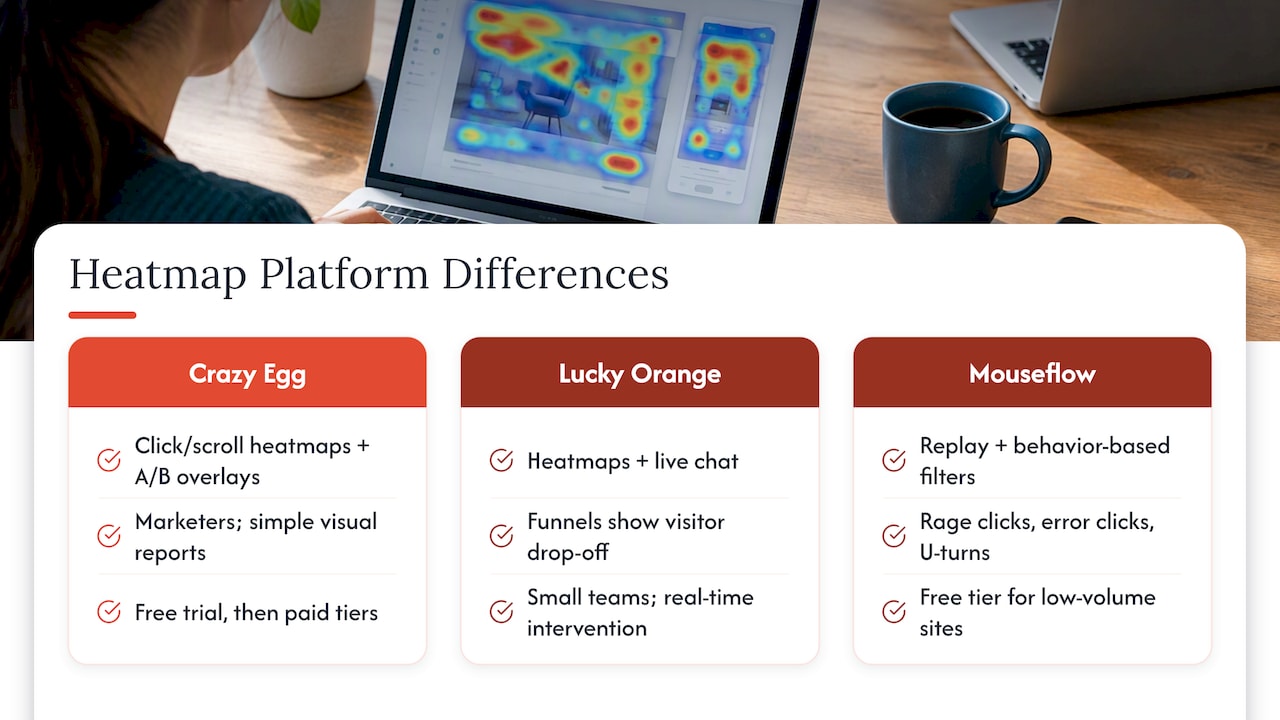
Crazy Egg is one of the longest-running names in this space, built as an all-in-one visual analytics tool. Its standout is combining straightforward click and scroll heatmaps with basic A/B test overlays, so marketers can see both where people click and which page variant performed better without switching tools. It offers a free trial before moving to paid tiers, and best fits marketers who want simple visual reports rather than deep behavioral science.
Lucky Orange pairs heatmaps with live chat and conversion funnel tracking in the same dashboard, which makes it a strong pick for small teams that want to catch a frustrated visitor in real time and intervene. The funnel view shows exactly where in a multi-step process visitors drop off, a detail plain click heatmaps can’t show on their own.
Mouseflow leans into UX research with detailed session replays and user segmentation, letting teams filter recordings by behavior (rage clicks, error clicks, u-turns) rather than scrolling through hundreds of sessions manually. It supports click, scroll, and movement heatmaps, offers a free tier for low-volume sites, and includes redaction controls for sensitive fields. UX researchers who need to segment recordings by behavior pattern get more out of Mouseflow than out of simpler visual-only tools.
Glassbox is built for enterprise digital experience teams, particularly in regulated industries like banking and insurance, with high-fidelity session replay across both mobile apps and web. Its redaction and compliance tooling is more extensive than most competitors because its buyers operate under strict regulatory scrutiny. There’s no published self-serve pricing; it’s sold as an enterprise contract.
Microsoft Clarity stands alone as a completely free product with no usage cap, offering click and scroll heatmaps plus session recordings. There’s no paid tier to upgrade into because the whole product is free, funded as part of Microsoft’s broader advertising and analytics ecosystem. For a small site or a solo founder validating a new page, Clarity removes the budget question entirely.
FullStory combines heatmaps and session replay with deep event-level analytics, letting product teams query specific user actions across recorded sessions rather than only watching recordings one at a time. That event analytics layer is the standout: it turns session replay from an anecdotal tool into something closer to a searchable database of user behavior. Pricing is quote-based with a trial available.
Hotjar built its reputation on being the easiest heatmap tool to set up, pairing heatmaps and session recordings with feedback widgets (surveys, incoming feedback buttons) in a single install. It offers a genuinely usable free plan, which is why it’s the most common first tool for small product teams and conversion specialists. The feedback widgets add a qualitative layer that pure heatmap tools don’t include.
Quantum Metric targets large organizations that want behavioral data tied directly to revenue and business KPIs, not just page-level engagement. Its differentiator is connecting session behavior to the metrics an executive team actually tracks, which matters more at enterprise scale where a conversion shift can translate to real revenue. It’s sold on enterprise contracts with no published self-serve pricing.
Smartlook covers both mobile apps and websites in a single dashboard, which matters for product teams whose users move between a mobile app and a web experience. It supports heatmaps and session recordings across both platforms with a free tier for smaller volumes, making it one of the few tools built cross-platform from the ground up rather than adding mobile as an afterthought.
Plerdy rounds out its heatmaps with event tracking and on-page surveys, giving marketers a way to collect direct visitor feedback alongside behavioral data in the same tool. It fits teams that want heatmaps and lightweight voice-of-customer collection without adding a separate survey platform.
VWO Insights is part of a broader experimentation platform, and its heatmaps, session recordings, and experiment integrations are built to feed directly into A/B testing workflows. Teams already running structured experiments get the most value here, since heatmap findings can turn into a new test variant without exporting data between tools.
Zoho PageSense makes the most sense for teams already inside the Zoho ecosystem, since its heatmaps and conversion optimization features integrate with Zoho’s CRM and marketing tools. Outside that ecosystem, it’s a competent but unremarkable heatmap tool; inside it, the integration removes friction other tools would add.
UXCam, LiveSession, and Sprig each serve narrower niches: UXCam focuses on mobile app session replay and heatmaps for product teams building native apps, LiveSession offers lightweight web session recording and heatmaps aimed at smaller engineering and support teams, and Sprig centers on in-product surveys and feedback paired with lighter behavioral tracking rather than a full heatmap suite. Each is worth a look only if your core need matches that specific niche rather than general-purpose web heatmapping.
What Heatmap Tools Actually Cost
Heatmap pricing generally follows a few models, such as sessions tracked per month, pageviews measured, or a per-seat fee for team members who access the dashboard. Small sites with modest traffic usually come out ahead on a session-based or pageview-based plan, since a tiered seat fee only pays off once several people on your team are actively using the dashboard.
To estimate what you need for a useful pilot, look at your existing analytics for the page you want to study and check its monthly sessions. A page getting regular traffic may be enough to spot a pattern in click and scroll behavior; a page with only a handful of visits a month will take longer to produce a reliable signal, regardless of which tool you use.
- Compare plans by sessions-per-month caps rather than by feature list alone; most tiers differ more in volume than in capability.
- Favor a tool with a genuine free tier (not just a time-limited trial) if you’re testing on a single page before committing budget.
- Ask whether session recordings count against the same cap as heatmaps, since some vendors bill them separately.
- Check whether the plan resets monthly or rolls over unused sessions, which matters for seasonal traffic.
Several heatmap vendors offer a free tier or trial specifically so small sites can pilot the tool on one page before paying for broader coverage, which is the cheapest way to validate whether heatmap data will actually change how you design a page.
Cost-saving tactics that work regardless of vendor: limit tracking to your two or three most important pages instead of the whole site, keep the pilot window short, and turn off session recording on pages where you only need the aggregate heatmap view. Each of these reduces both the session count you’re billed for and the amount of potentially sensitive data you’re storing.
Privacy, Consent, and Session Replay Risk
Session recording raises a different risk profile than aggregate heatmaps, because a recording can capture exactly what a visitor typed, clicked, and saw in sequence. Regulators treat this as a form of intrusive behavioral monitoring, and under frameworks like GDPR, session replay typically requires explicit, affirmative opt-in consent rather than a pre-checked or implied default. The Federal Trade Commission has gone further, warning that using tracking technologies to collect information in confidential contexts without affirmative express consent can count as an unfair or deceptive practice, and that a business stays responsible for what its third-party vendors do with that data even after it’s handed off.
The practical risk is bigger than most teams expect. Manual reviews of session-replay scripts across the web have found evidence of recordings on thousands of sites along with several severe leaks of personal data, often because redaction settings were misconfigured or didn’t catch a custom form field. Redaction is brittle by nature: it has to be told exactly which fields to mask, and a new form added to a page without updating those settings can expose data that was supposedly protected.
A short, practical checklist covers most of the exposure:
- Get explicit opt-in consent before recording starts, not a buried mention in a privacy policy.
- Turn on redaction for every input field, and re-check it whenever you add or change a form.
- Set retention to 30 to 90 days rather than the 12-month default many vendors ship with, since shorter retention windows align better with data minimization principles.
- Use server-side tracking where available to reduce the amount of raw data that ever reaches a third-party vendor.
- Audit a sample of recorded sessions periodically to confirm redaction is actually working as configured.
Pro Tip: Wire your consent banner to block the heatmap script from firing until a visitor opts in, and route what you can through server-side tracking with GTM and consent wiring so sensitive fields never reach the vendor in the first place.
Which Heatmap Tool Should You Actually Start With?
For most small product teams, Hotjar is still the easiest starting point: a usable free plan, straightforward setup, and feedback widgets that add context heatmaps alone can’t give you. If budget is the only constraint, Microsoft Clarity gets you unlimited click and scroll heatmaps plus recordings at no cost, which is hard to beat for a first test. Teams that need deeper segmentation of session replay should look at Mouseflow, while enterprise teams juggling regulatory requirements are better served by Quantum Metric or Glassbox.
A 30-day pilot works well regardless of which tool you pick:
- First, wire up consent, install the script on a high-value page, and confirm redaction is working.
- Then, let sessions accumulate against a defined cap; resist the urge to act on early data.
- Finally, compare scroll depth, click patterns, and any drop-off points against your existing analytics baseline.
- After 30 days: decide whether to expand to more pages or try a second tool before renewing.
Set consent first, test one page, and measure against your current baseline before expanding.
What I’ve Learned Watching Small Business Sites Run Heatmaps
The biggest wins I’ve seen on client sites rarely come from exotic features. They come from someone finally noticing that a call-to-action button sits below where half of visitors stop scrolling, or that a checkout form has fields nobody fills in because they look optional when they aren’t. Heatmaps are good at surfacing that kind of friction fast.
The part teams skip is the plumbing. Heatmap tools are only as trustworthy as the consent and data handling wrapped around them, which is why we consider consent and data handling when setting up tracking for a client site.
The failure mode to watch for is over-reading a small sample. A heatmap built from forty sessions on a low-traffic page will show noise, not a pattern, and acting on it can send you fixing a problem that doesn’t exist.
— George
Need Help Wiring Up Heatmaps the Right Way?
Reading a heatmap is the easy part. Getting the tracking installed correctly, consent wired in before any script fires, and redaction actually configured for your specific forms takes more setup time than most small business owners have between running the rest of the business.
That’s the gap our Website Launchpad program is built to close. Alongside the custom site build, we can discuss tracking and consent needs, with Managed Core, Growth Care, or Commerce Care support plans available.
A managed setup makes the most sense when:
- Your team doesn’t have the bandwidth to configure consent banners, tag managers, and redaction settings correctly on your own.
- You’re in an e-commerce or service business where a compliance misstep carries real exposure.
- You want tracking data you can trust within weeks of launch rather than months of trial and error.
If you’re starting a new site or rebuilding an existing one, take a look at our Commerce and Signature packages or reach out through Red Rock Webscapes to talk through what your tracking setup should look like before you pick a heatmap tool.
FAQ
What is the best heatmap tool for a small business website?
Hotjar is generally the best starting point for a small business site because it combines click and scroll heatmaps, session recordings, and feedback widgets in one tool with a usable free plan. Microsoft Clarity is the better fit if budget is the only concern, since it’s free with no session cap.
Are free heatmap tools as good as paid ones?
Free tools like Microsoft Clarity cover core click, scroll, and recording features well enough for most small sites, but paid tools typically add deeper segmentation, redaction controls, and integrations with A/B testing platforms. The right choice depends on whether you need that extra depth or just want to spot obvious friction points.
Do I need visitor consent before recording heatmap sessions?
Yes. Session replay is treated as a form of behavioral monitoring that typically requires explicit, affirmative opt-in consent rather than a default-on setting, and the FTC has warned that collecting data without that consent can be an unfair or deceptive practice.
How long should a heatmap tool retain session recordings?
Authoritative guidance suggests retaining session data for 30 to 90 days rather than the 12-month default many vendors use, since shorter retention aligns better with data minimization principles. Check your vendor’s default setting and adjust it manually if needed.
How much traffic do I need to run a useful heatmap pilot?
A page getting a few hundred sessions a month is usually enough to reveal a reliable click or scroll pattern within two to four weeks. Lower-traffic pages will take longer to produce a trustworthy signal, regardless of which heatmap tool you use.
Sources
- No boundaries: Exfiltration of personal data by session-replay scripts
- Notice of Penalty Offenses Concerning Misuse of Information Collected in Confidential Contexts Cover Letter