Yes, nearly every U.S. website needs a privacy policy if it collects or shares personal information, targets ads, or serves children or regulated sectors. The main triggers are collecting contact details, running analytics or ad trackers, selling or sharing data, or handling health, financial, or children’s information. Five federal frameworks anchor most obligations: COPPA, HIPAA, CCPA/CPRA, GLBA, and CAN-SPAM.
Key Takeaways
Most U.S. websites must have a privacy policy if they collect, share personal data, or target specific sensitive sectors, to comply with multiple federal and state regulations.
| Point | Details |
|---|---|
| Legal triggers for policies | Data collection, sharing, or targeted content activates legal obligations for privacy policies. |
| Mandatory disclosures | Policies must clearly explain data collection practices, sharing, user rights, and cookie use. |
| Placement and notices | Links to policies should be prominent, and notices at points of data collection improve compliance. |
| Ongoing compliance checks | Regular audits of tools, data flows, and policies prevent gaps and legal risks. |
| Redrockwebscapes approach | We integrate compliance into site design, placement, and support, ensuring privacy standards from launch. |
Table of Contents
- When is a privacy policy required for U.S. websites?
- What a U.S. privacy policy must disclose: a checklist of mandatory elements
- Law-by-law callouts: what COPPA, HIPAA, CCPA, GLBA, and CAN-SPAM each require
- Implementing the policy: placement, notice at collection, and cookie consent
- Enforcement risks and the compliance mistakes that invite them
- How we build privacy compliance into every site we launch
- How to audit your privacy policy for ongoing compliance
- Tools and templates for building a small business privacy policy
- Perspective: keep privacy policies accurate, not just long
- How we can help you launch a privacy-compliant website
- FAQ
- Sources
When is a privacy policy required for U.S. websites?
There is no single federal law that forces every website to post a privacy policy. What actually triggers the requirement is behavior: certain kinds of data collection and certain business activities pull you into one or more legal frameworks, and each of those frameworks expects a policy or notice as proof you are following the rules.
Here are the practical triggers that make a privacy policy necessary for most small business and e-commerce sites:
- Collecting names, emails, phone numbers, IP addresses, or device identifiers through forms, accounts, or checkout flows
- Running analytics tools, retargeting pixels, or third-party ad networks that drop cookies or track visitors across sites
- Selling or sharing personal data with partners or advertisers, which several state laws now define broadly enough to include common ad-tech arrangements
- Operating a site directed at children under 13, or processing health records or financial account data, which pulls in COPPA, HIPAA, or GLBA obligations
- Making any public statement about privacy that does not match actual practice, which the FTC treats as a deceptive practice regardless of size or industry
That last point matters more than most site owners realize. The FTC’s authority does not depend on a specific privacy statute. If your site claims it does not share data with third parties while your analytics setup quietly does, that mismatch alone can trigger scrutiny. The agency has made clear that staying silent about data practices can itself be treated as deceptive when a reasonable visitor would be surprised to learn what actually happens with their information.
For an e-commerce store, the combination of payment collection, email marketing, and third-party checkout plugins almost guarantees you hit at least two or three of these triggers simultaneously. A local service business with a simple contact form and Google Analytics installed is also covered, even without processing payments. The threshold for “you need a policy” is lower than most owners assume, and the cost of skipping one, in legal exposure and lost customer trust, is higher than the cost of writing one properly.
What a U.S. privacy policy must disclose: a checklist of mandatory elements
A compliant policy is not a generic legal template swapped with your business name. It needs specific, accurate disclosures that match what your site actually does. Use this checklist as your baseline before publishing or updating a policy.
- Effective date and scope. State when the policy took effect and which properties, sites, or apps it covers.
- Contact information. Provide a working email, mailing address, or form so visitors can reach you with privacy questions or requests.
- Categories of personal information collected. List what you gather (names, emails, payment details, browsing data) and where it comes from: direct submission, third parties, or automated trackers.
- Purposes of processing. Explain why you collect each category: order fulfillment, marketing, analytics, fraud prevention.
- Sharing and disclosure categories. Distinguish between service providers who process data on your behalf and any sale or sharing arrangement with advertisers or data brokers.
- Cookies and tracking technologies. Describe what you use, what each does, and how visitors can control or opt out of it.
- Consumer rights and request procedures. Explain how someone can access, correct, or delete their data, and how long you take to respond.
- Retention and deletion practices. State roughly how long you keep different categories of data and when you delete it.
- Sector-specific notices where applicable. Add a COPPA parental notice and consent mechanism for child-directed sites, a HIPAA Notice of Privacy Practices for covered health services, a GLBA privacy notice for financial institutions, and CAN-SPAM-compliant opt-out language in marketing emails.
The COPPA requirement is specific: sites directed at children under 13, or that have actual knowledge they are collecting data from children that age, must post a clear, comprehensive policy and secure verifiable parental consent before collecting most information, with defined rules on retention and a parent’s right to review or delete their child’s data, according to the FTC’s compliance guidance.
HIPAA-covered entities face a parallel but distinct obligation. They must develop a Notice of Privacy Practices and post it prominently on any website offering customer service or benefits information, and as of February 16, 2026, those notices must also reflect updated guidance covering substance use disorder records where applicable, per HHS guidance.
Pro Tip: Write your cookie and sharing sections in plain language first, then have your attorney tighten the legal phrasing. A policy nobody can parse protects no one.
Law-by-law callouts: what COPPA, HIPAA, CCPA, GLBA, and CAN-SPAM each require
Each of these frameworks creates its own layer of obligation on top of a general privacy policy. Knowing which ones apply to your business determines what extra notices, consent flows, or disclosures you need to build.
- COPPA requires a clear, comprehensive online privacy policy for child-directed sites or services, a direct parental notice, a verifiable consent mechanism before collecting most personal information from children under 13, and defined retention and deletion rules, with the policy linked prominently on the homepage and at every collection point.
- HIPAA requires covered entities to maintain a Notice of Privacy Practices explaining how protected health information is used and disclosed, make it available on request, and post it on any website that provides customer service or benefits information tied to covered services.
- CCPA/CPRA applies to businesses meeting California’s thresholds and requires a notice at collection, clear opt-out mechanisms for the sale or sharing of personal information, a documented process for consumer requests to access or delete data, and specific disclosures about data categories and third-party sharing.
- GLBA requires financial institutions, a category that includes many lenders, payment processors, and businesses extending consumer credit, to provide a privacy notice describing information-sharing practices and to maintain safeguards protecting customer financial data.
- CAN-SPAM requires every commercial email to include a working opt-out mechanism, the sender’s valid physical postal address, and accurate header and subject-line information, with opt-out requests honored within 10 business days, according to the FTC’s compliance guide.
These obligations overlap in practice. An e-commerce store running email marketing campaigns needs CAN-SPAM-compliant unsubscribe links inside every promotional email, separate from whatever opt-out mechanism its privacy policy describes for data sharing generally. A telehealth startup needs both a standard privacy policy for its marketing site and a HIPAA Notice of Privacy Practices covering the clinical side of the business. Treating these as one document often creates gaps: a single combined policy can satisfy multiple laws, but only if someone checks that every required element from each applicable law actually made it into the text.
Implementing the policy: placement, notice at collection, and cookie consent
A well-written policy that nobody can find or understand in the moment it matters does not do much good. Implementation is where compliance either holds up or falls apart.
- Place the link everywhere it needs to be. Put a conspicuously labeled “Privacy Policy” link in your site footer, on your homepage, and directly at every data collection point: signup forms, checkout pages, embedded chat widgets, and account creation screens.
- Add notice at collection, not just a footer link. Next to a form field asking for an email or phone number, include a short line explaining what you will use it for and linking to the full policy. Checkout pages should disclose what payment and shipping data you collect before the customer submits it.
- Architect your cookie consent intentionally. Decide whether your tracking relies on consent-based or legitimate-interest-based processing, and use banners with granular toggles when you run analytics, advertising, and functional cookies together so visitors can opt out of some without breaking the site.
- Build a real consumer request process. Set up a form or email alias that captures the request type, verifies identity appropriately, logs the date received, and tracks your response deadline.
- Keep a version log. Record every policy update with a date and summary so you can show what changed and when, which matters if a dispute ever arises.
Pro Tip: A static “Privacy Policy” link in the footer satisfies almost nobody’s expectations anymore. Pair it with short, contextual notices at the exact point where you ask for data.
Enforcement risks and the compliance mistakes that invite them
The FTC’s core enforcement tool against website privacy failures is its authority over unfair or deceptive practices, which it has used against businesses whose stated privacy practices did not match what their systems actually did, according to its privacy and security guidance. State attorneys general have grown more active too, particularly under newer state privacy statutes.
One in a growing number of state privacy laws now requires conspicuous “privacy” labeling on policy links, a formatting detail that regulators flag specifically because vague labels like “Legal” or “Info” leave consumers unable to find the notice, per Colorado’s official CPA rules.
Common failures that draw scrutiny include:
- Missing or buried notice at collection, so visitors never see what happens to their data before submitting it
- Vague language describing data “sharing” that avoids the specific definitions state laws use for “sale” or “share”
- No functioning opt-out mechanism, or one that technically exists but does not actually stop tracking
- Failure to respond to consumer access or deletion requests within the timelines state rules specify
- Policies that describe practices from a previous version of the site, left unupdated after adding new tools or vendors
The fix is rarely complicated: write policies that match reality, document your internal process for handling requests, and revisit the policy every time you add a new tracking tool, payment processor, or marketing integration.
How we build privacy compliance into every site we launch
When we build a site for a small business or e-commerce client, privacy implementation is not an afterthought bolted on after launch. We place policy links in the footer, the main navigation where relevant, and directly at form fields and checkout steps, so visitors see notice at the exact point they hand over information.
Our builds typically include:
- Consent scripts configured for the specific analytics and ad tools the client actually uses, not a generic cookie banner
- A consumer request intake form that logs the request type and date, helping ensure responses before any deadlines
- Documentation of third-party tools or vendors integrated into the build, including what data each one touches
- A handoff package at project completion explaining what was configured and what needs to be maintained going forward
We recommend clients revisit their privacy setup any time they add a new plugin, swap payment processors, or launch a new marketing integration, since each of those changes can introduce a new data flow the existing policy does not cover. For e-commerce clients specifically, this matters at checkout, where payment data, shipping information, and marketing opt-ins all get collected in the same flow and each needs its own accurate disclosure.
How to audit your privacy policy for ongoing compliance
A privacy policy is not a document you write once and forget. Treat it like any other piece of business infrastructure that needs periodic review.
Start by listing every tool, plugin, and third-party service connected to your site: analytics, ad pixels, payment processors, email platforms, chat widgets, and CRM integrations. Compare that list against what your current policy actually discloses. Gaps here are the most common audit finding.
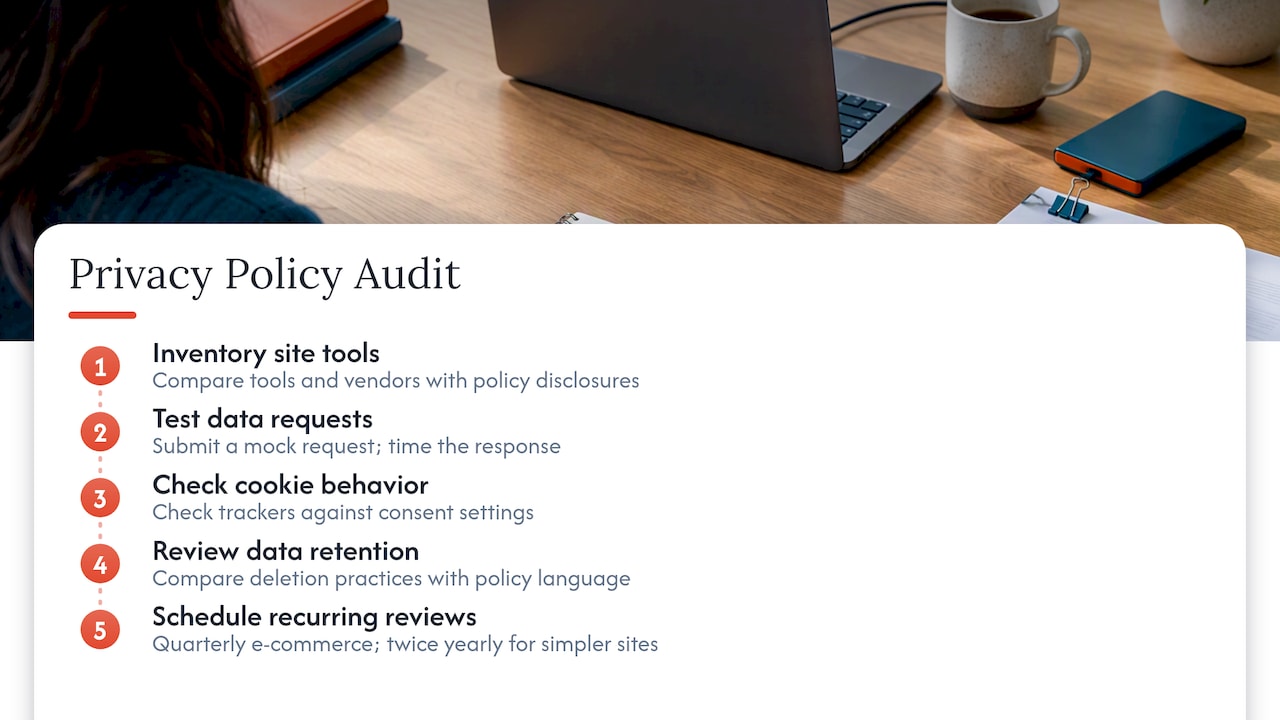
Next, test your own data request process. Submit a mock access or deletion request through your own form and time how long it takes to get a response. If nobody internally knows who owns that process, you have found your biggest risk.
Check your cookie banner against what is actually loading on the page. Browser developer tools or a simple cookie-scanning extension will show you trackers firing before consent is given, a common mismatch between stated practice and actual behavior.
Review your retention language against what you are actually doing with old customer data. If your policy says you delete inactive accounts after a set period but nobody has automated or performed that deletion, that is a disclosure that does not match reality.
Finally, set a recurring calendar reminder, quarterly for active e-commerce sites, at least twice a year for simpler sites, to repeat this check. New integrations and marketing tools get added constantly, and each one can quietly create a new disclosure gap.
Tools and templates for building a small business privacy policy
Several reputable template generators and legal-tech platforms let small business owners draft a baseline privacy policy by answering guided questions about data collection, cookies, and third-party sharing. These tools work well as a starting point, especially for straightforward informational or service sites, but they rarely account for sector-specific obligations like COPPA parental consent flows or a GLBA safeguards program on their own.
For sites handling health information, HHS publishes model Notices of Privacy Practices with explicit instructions on required elements, including updated combined-notice language for entities that also handle substance use disorder records. These models are a safer foundation than a generic template because they are written to the exact legal standard HIPAA requires.
For e-commerce sites integrating multiple vendors, keep a running document listing each third-party processor, the category of data it touches, and whether a data processing agreement or business associate agreement is in place, since HHS guidance on business associates makes clear that contractual coverage matters as much as the policy text itself.
Whichever template or tool you start with, have the output reviewed against your state’s specific requirements before publishing. A template built for general U.S. compliance will not automatically catch a state-specific labeling rule or a newly enacted disclosure requirement.
Perspective: keep privacy policies accurate, not just long
The instinct to protect a business legally often produces privacy policies so dense that no customer actually reads them, which defeats half the point. A better approach layers a short, plain-English summary at the point of collection with a full legal policy underneath it for anyone who wants the detail.
For most small businesses, the priorities that matter most are a retention period you can actually explain, an opt-out that works the first time someone clicks it, and a documented internal process for handling requests rather than a scramble when one arrives. Review the policy every time you add a new tool, not on a fixed annual schedule divorced from what is actually changing on your site.
— George
How we can help you launch a privacy-compliant website
Building privacy compliance into a site from day one is easier than retrofitting it later, and that is how we approach every build. Our Website Launchpad program pairs a low-upfront-cost launch with managed care plans like Managed Core, Growth Care, and Commerce Care, each including ongoing support for the kind of policy updates and tracking changes that compliance depends on.
For e-commerce builds specifically, our Commerce and Signature packages include the footer placement, checkout-page notices, and cookie consent setup discussed throughout this guide, and our ecommerce-focused builds extend that to Brick & Mortar, E-Tail, and Dropshipping store types.
A typical engagement includes:
- Privacy policy placement across the footer, homepage, and every collection point
- Notice-at-collection language built into forms and checkout flows
- A consumer request intake form with logging built in
- Documentation handoff listing every third-party tool integrated into your build
If you are ready to launch a site built with these pieces in place from the start, explore our packages to find the right scope for your business.
This article is general information, not a substitute for advice from a qualified lawyer. Consult a qualified legal professional about your own circumstances before acting on anything here.
FAQ
Is it a legal requirement to have a privacy policy on a website?
Most U.S. websites need one if they collect personal information, use tracking cookies, sell or share data, or serve children or regulated industries. There is no single federal law requiring every site to have one, but state laws like California’s CCPA/CPRA and sector laws like COPPA and HIPAA make a policy effectively mandatory for most businesses.
What is required in a website privacy policy?
A compliant policy needs an effective date, contact information, the categories of data you collect and their sources, how you use and share that data, your cookie and tracking practices, and a clear process for consumer rights requests. Sites covered by specific laws also need added notices, such as a parental consent process under COPPA or a Notice of Privacy Practices under HIPAA.
What are the main privacy regulations in the United States?
The core frameworks are COPPA for children’s data, HIPAA for health information, GLBA for financial institutions, CAN-SPAM for commercial email, and state laws like California’s CCPA/CPRA that regulate data sale and sharing more broadly. The FTC enforces general privacy and data security standards across industries under its unfair and deceptive practices authority.
Is GDPR required in the USA?
GDPR is a European Union law and does not apply to a typical U.S. business unless it targets or monitors EU residents directly. U.S. site owners should focus compliance efforts on federal laws like COPPA, HIPAA, and CAN-SPAM alongside applicable state privacy statutes rather than GDPR.
Sources
- Children’s Online Privacy Protection Rule (COPPA) — Compliance resources | FTC
- Privacy practices for protected health information | HHS
- Privacy & Security | Federal Trade Commission