AI-assisted web development means a human developer uses AI tools to draft code, layouts, copy and tests faster, then reviews, secures and maintains the result. It is not the same as pressing a button and getting a finished business website. For a small business owner, the practical upside is shorter build cycles and lower upfront cost. The practical risk is paying for code nobody has checked.
This guide explains what the approach actually involves, where it helps, where it fails, and what to ask any developer who says they use it.
Key takeaways
- AI speeds up the first draft of a site. Judgment, security review and ongoing maintenance still come from people.
- Most developers now use these tools. Stack Overflow’s 2025 survey found 84% of respondents using or planning to use AI in their development process.
- AI-generated code is not finished code. It needs version control, scanning and updates like any other software.
- Ask a developer what AI does in their workflow, who reviews it, and who looks after the site after launch.
- Claims that AI replaces a web professional outright deserve skepticism, and regulators have started acting on inflated AI claims.
Table of Contents
- What AI-assisted web development actually is
- Where AI genuinely helps a small business
- Where AI falls short
- Treat AI-written code as a draft, not a finished product
- A quick checklist for judging any AI-assisted build
- Beware inflated promises
- Our perspective
- How this shows up in our packages
- Where to start with your own project
- FAQ
- Sources
What AI-assisted web development actually is
The phrase covers a range of practices, and it helps to separate them.
Code assistance. A developer works in an editor where an AI suggests functions, writes boilerplate, explains unfamiliar code or drafts tests. The developer accepts, edits or rejects each suggestion.
Agentic tools. Newer tools take a task in plain language, then edit files, run commands and iterate across several steps. A 2026 overview from Developers Digest describes an AI coding agent as a program that decides which actions to take and keeps going until the task is done or it gets stuck. That “gets stuck” part is why a person still supervises.
Design and content drafting. AI proposes page layouts, color options, headline variants, product descriptions and alt text. These are starting points that need a brand and a human editor.
Operations. AI helps with performance suggestions, accessibility checks, and routine workflow automation such as routing form submissions or summarizing support requests. We cover that last area in our post on AI workflow automation and NIST guardrails.
None of these removes the need for someone who understands how a site should be structured, hosted, secured and found on Google. They change how fast that person can work.
Where AI genuinely helps a small business
Faster first drafts, shorter timelines
The slowest part of many projects is getting from a blank page to something you can react to. AI compresses that stage: a working page template, a product grid, a contact form wired to email. You see progress earlier, and feedback can start sooner. That is where most of the time saving comes from.
Lower cost for routine work
A good share of any site is standard: navigation, forms, responsive layouts, product pages. When routine work takes fewer hours, a project can be priced more accessibly or the saved hours can go into the parts that make your business different. If you are budgeting, our breakdown of what small businesses pay for a website in 2026 shows how to compare quotes.
More room for custom work
Features that once felt out of reach for a small budget, such as a simple booking tool, a customer lookup page or an internal ordering app, become more realistic when the scaffolding is generated quickly. The custom logic still needs to be specified and tested by a person.
Faster testing and cleanup
AI can draft automated tests, flag oversized images, and suggest fixes for slow scripts. Used well, it catches dull problems before customers do.
Where AI falls short
The limits matter more than the pitch, so here they are plainly.
- It produces confident mistakes. Generated code can look right and fail on an edge case, such as a checkout that mishandles a discount code or a form that drops an entry.
- It does not know your business. It does not know that your Las Vegas shop closes early on Sundays, that your wholesale customers need net-30 invoicing, or that your brand never uses a certain phrase.
- It is not deterministic. web.dev’s guidance on responsible AI notes that model behavior can vary, which is why rigid version control and automated testing are essential for production systems.
- It can leak what you feed it. The same guidance points to the risk of exposing passwords, API keys and personal data to public models, and recommends redacting secrets before analysis.
- It does not take responsibility. When a site goes down or a customer’s data is exposed, a tool cannot answer for it.
Treat AI-written code as a draft, not a finished product
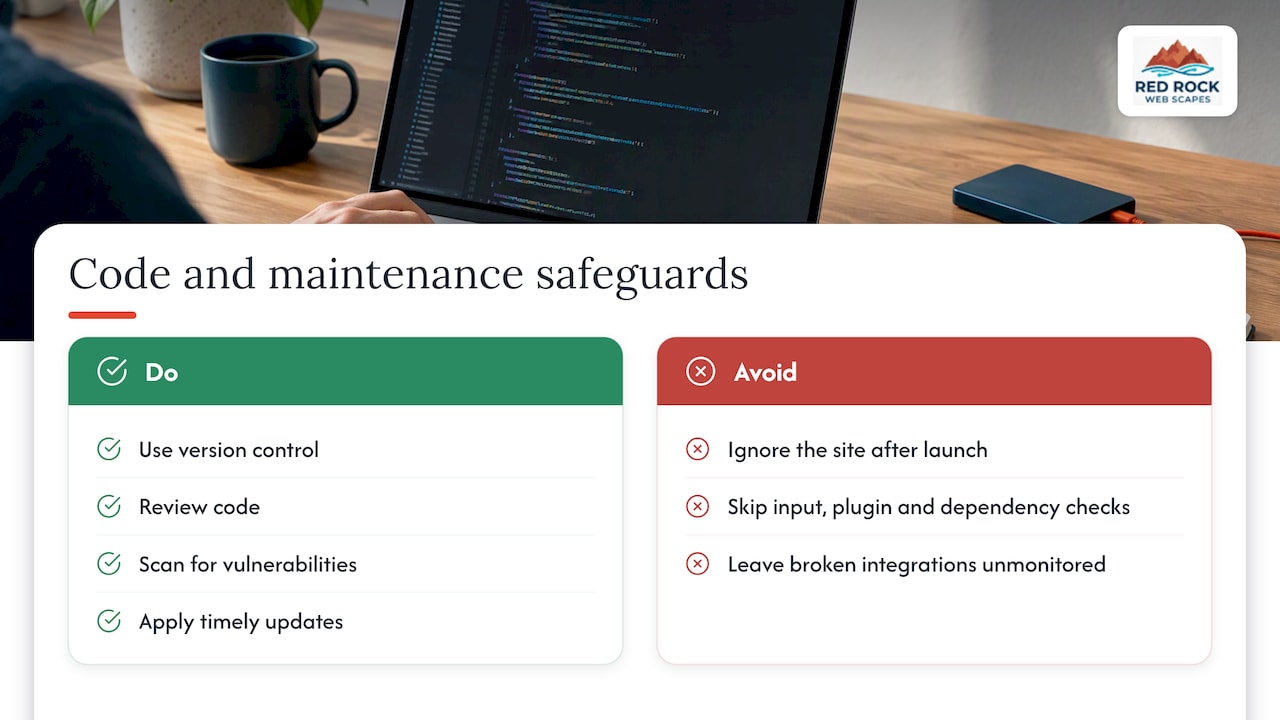
This is the point owners most often miss. NIST’s work on generative AI and secure development, SP 800-218A, extends its Secure Software Development Framework to cover AI-related practices. The message for a business is simple: code that came from a model deserves the same lifecycle discipline as code written by hand. That means version control, review, vulnerability scanning and timely updates.
NIST experts also flag that AI-driven development can blur the line between system code and data, which opens the door to injection-style attacks. In plain terms, a site built quickly still needs someone checking that user input, plugins and dependencies cannot be abused.
There is a maintenance side too. A site that was launched in a week and then ignored for two years will accumulate outdated components, expired certificates and broken integrations. Monitoring catches these before customers do. Independent uptime services such as multi-location failure confirmation and incident reporting from Uptime Beacon show what a disciplined response looks like when something breaks. For a small business, the equivalent is a maintenance plan with a named owner. Our guide to small business website maintenance, with a 30 minute audit and care tiers walks through what that should include.
A quick checklist for judging any AI-assisted build
Use these questions before you sign anything.
- What does AI do in your process, and what does a person do? A clear answer names the review steps.
- Who owns the code and accounts? You should hold the domain, hosting login and repository access.
- How is the site secured and updated after launch? Ask who patches it and how often.
- Is pricing tied to deliverables? Milestone or flat-fee pricing is easier to evaluate than open-ended hourly work.
- Is the site accessible? Ask whether they build to the WCAG 2.1 recommendations for people with disabilities.
- What happens to your customer data? If you collect emails or take orders, you also need accurate disclosures. See our list of U.S. website privacy policy requirements.
- Can they show results? Ask for live sites, not mockups.
Beware inflated promises
The market is full of claims that AI can replace a designer, lawyer or developer outright. Regulators have noticed. In a case involving the company DoNotPay, the FTC alleged unsubstantiated claims about what its AI service could do, including analyzing a small business website for legal violations; the FTC’s final consent documents describe the allegations. Its Northwest regional office has published related press materials on the settlement. The lesson for buyers: if a vendor promises human-level results from a tool alone, ask for evidence.
The job market tells a similar story. The Bureau of Labor Statistics projects 7% employment growth for web developers and digital designers from 2024 to 2034, much faster than average, with a 2024 median wage of $95,380. Skilled people are still in demand, and the tools are changing what they do each day.
Our perspective
We build sites for small businesses, especially e-commerce sellers, and we use AI as part of how we work. We pair traditional agency craft with AI-assisted methods, and what we get from that is speed: faster development cycles and room to try more ideas before the budget runs out.
What we do not do is hand you raw output. Design decisions, structure, search setup, hosting and what happens after launch stay with people who answer your calls. We would rather show you the process, the milestones and the price than ask you to trust a black box.
The owners we talk to usually want three things: a site that goes live without a huge upfront bill, a store that can start selling quickly, and someone to call when something breaks. AI helps with the first two. Good process and ongoing care deliver the third. If a vendor sells you only the speed, ask who is there in month six.
— George
How this shows up in our packages
If you want to see how the approach translates into real pricing, here is what we publish. Prices are in US dollars, as listed on our site.
| Offer | What it is | Published price |
|---|---|---|
| Commerce package | Online store build | From $2,000 one-off |
| Signature package | Custom site build | From $2,500 one-off |
| Brick & Mortar | E-commerce for existing shops | From $2,500 one-off |
| E-Tail | Full online retail store | From $3,500 one-off |
| Dropshipping | Dropship store build | From $4,000 one-off |
| Design + Handoff | App design delivered to your developer | From $1,500 one-off |
| Design + Development | App design and build | From $2,500 one-off |
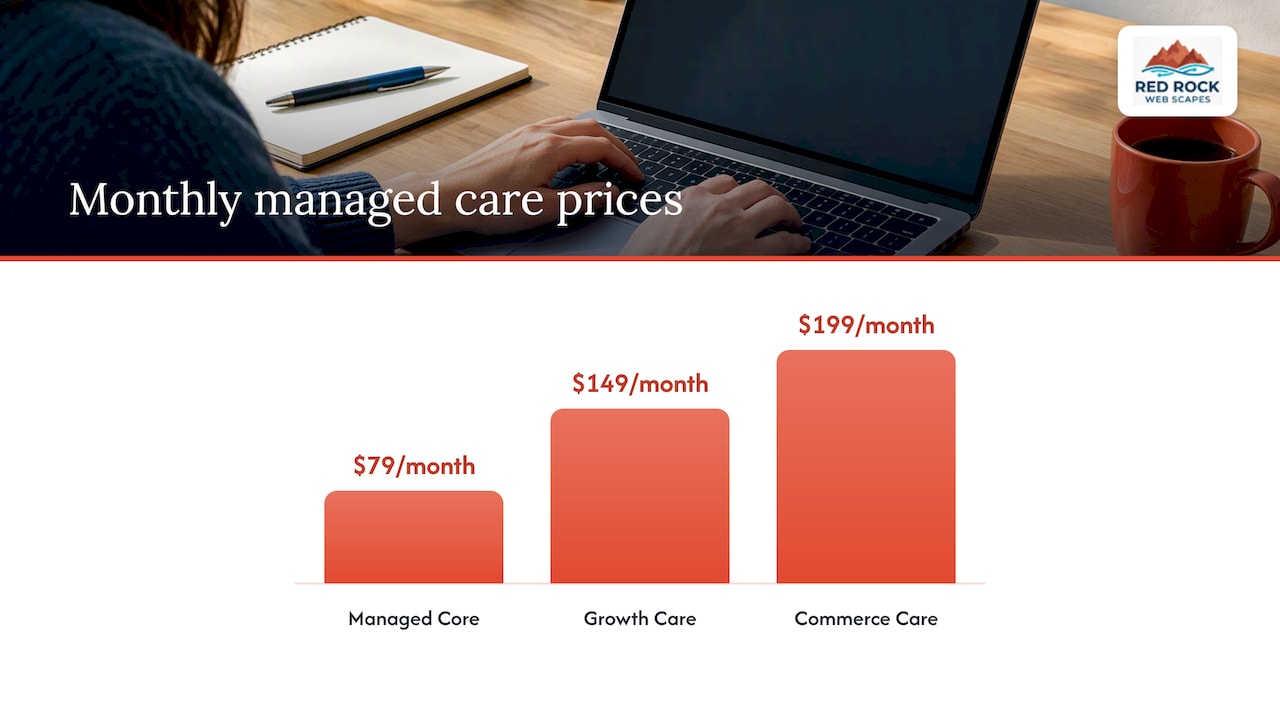
For the Website Launchpad program, the setup fee is $99 one-off for a standard business build and $150 one-off for an e-commerce store build. Managed care then runs $79 per month (Managed Core), $149 per month (Growth Care) or $199 per month (Commerce Care). Business email is $29 per month. Some packages, such as Launch, Essential and Growth, do not have a published price, so we quote them to your project.
You can compare the options on our packages page and the Website Launchpad page.
Where to start with your own project
A sensible sequence works for most small businesses.
- Define the goal. Do you need leads, bookings, or online sales? Write one sentence for it.
- Pick the smallest site that meets it. A local service business may need five pages and a Google Business Profile. A seller needs a catalog, checkout and shipping rules.
- Decide what AI should and should not touch. Drafting copy and layouts is fine. Handling customer data, payments and permissions needs human review.
- Budget for care. Hosting, updates, backups and support are part of the cost of owning a site.
- Plan for being found. For local retailers, local search setup matters as much as the build. We outline it on our SEO page.
If you want to use AI inside your own business, not just in how a site is built, our AI consulting service covers workflow and automation.
If you are in Southern Nevada, we also work locally through our Las Vegas web design page, and you can see our overall approach on the Red Rock Webscapes homepage.
FAQ
Can I build a website with AI alone?
You can generate a basic site with AI builders, and for a simple brochure page that may be enough. The trouble starts with payments, customer data, search visibility and upkeep, where mistakes cost money. Most businesses get better results when a professional directs the tools and reviews the output.
Will AI-assisted development make my site cheaper?
Often it lowers the cost of routine work, which can mean a lower upfront price or more features for the same budget. It does not remove ongoing costs like hosting, security updates and support. Compare quotes on deliverables and milestones, not just the headline number.
Is AI-generated code safe?
Not automatically. NIST’s guidance on secure development for generative AI says to apply the same secure development practices you would to any software. Ask your developer how code is reviewed, scanned and updated.
Is web development still a worthwhile career or service to hire?
The Bureau of Labor Statistics projects faster-than-average growth for web developers and digital designers through 2034. The work is shifting toward direction, review and integration, which is why experienced people remain valuable.
Sources
- Stack Overflow Developer Survey 2025: AI
- What Is an AI Coding Agent? The Complete 2026 Guide, Developers Digest
- AI governance: Build responsibly, web.dev
- Secure Software Development Framework, NIST CSRC
- Web Content Accessibility Guidelines (WCAG) 2.1, W3C
- FTC DoNotPay final consent documents
- FTC Northwest Region press releases
- Web Developers and Digital Designers, Occupational Outlook Handbook, BLS