A post-purchase upsell is an offer shown to a customer after they have paid, usually as a one-click add-on to the same order. Because the payment is already secured, the offer can’t cause a lost sale. That’s why it’s one of the few revenue tactics a small store can add without putting conversion at risk. The catch is that it only works if the offer is relevant, the decline button is easy to find, and the legal basics are covered. This guide covers all three, plus the technical limits on Shopify.
Key takeaways
- A post-purchase upsell appears after payment is confirmed, so it can’t reduce checkout conversion. It can still hurt trust if it feels like a trap.
- Upsell.com’s 2023 merchant data puts the average one-click conversion rate at 4.7%, with top offers reaching 28.3%. Your offer decides which end of that range you land on.
- Order bumps sit on the checkout page and suit small, cheap add-ons. Post-purchase offers suit a second product or a bigger step up.
- In the U.S., ROSCA and FTC rules require clear price and terms before the customer clicks to accept any extra charge.
- Shopify’s post-purchase offers have platform limits: Online Store orders only, and no more than three offers in a row.
Table of Contents
- What a post-purchase upsell actually is
- Post-purchase upsell vs. order bump
- What results to expect
- How to choose an offer people accept
- Design: make declining easy
- Shopify specifics you should know before you build
- The U.S. legal basics
- How to launch your first post-purchase offer
- Our perspective
- Working with us on your store
- FAQ
- Sources
What a post-purchase upsell actually is
The customer fills the cart, enters payment details and clicks the pay button. Before the final thank-you page, they see one more screen with a single offer: a second item, a bigger size, a bundle, a subscription. Accepting takes one click, because their card details are already on file for that transaction.
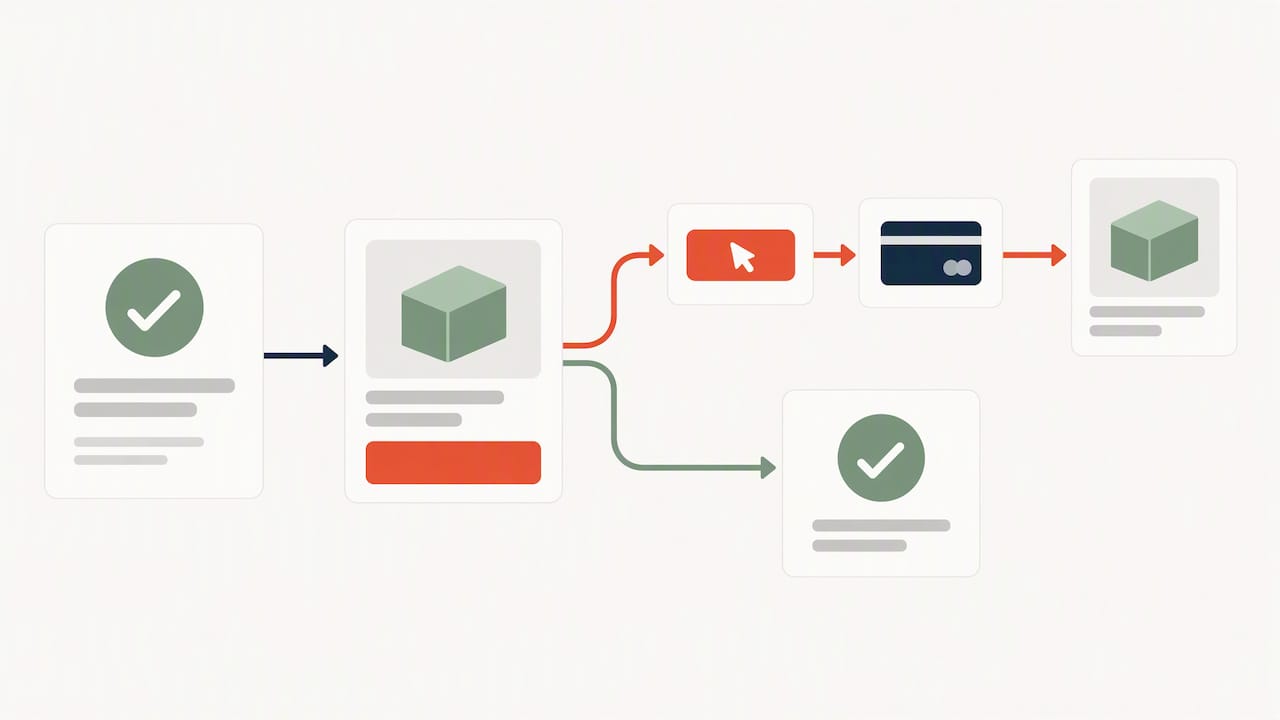
Shopify’s developer documentation describes the same thing. The offer is displayed right after checkout completes, and the page appears after the order is confirmed. In practice, it’s the digital version of the cashier asking whether you want the matching case while your receipt is printing.
The tactic has two flavors:
- Add to the same order. The accepted item is merged into the original order, so it ships together and the customer pays no second shipping fee.
- Create a separate order. This is more common when the offer is a different fulfillment type, such as a digital product or a subscription.
A related tactic is the thank-you page offer. It’s softer: the order is complete, and the page carries a recommendation or a discount for next time. It converts less because it takes more than one click, but it never delays the customer.
Post-purchase upsell vs. order bump
People often mix these up, and the difference matters for where you spend effort.
| Order bump | Post-purchase upsell | |
|---|---|---|
| Where it appears | On the checkout page, next to payment | After payment, before the final confirmation |
| Typical price | Low, an impulse add-on | Low to mid, sometimes a step up |
| Customer decision | Tick a box | Accept or decline a full offer |
| Risk to checkout | A cluttered form can lower completion | None to the sale already made |
| Best for | Accessories, warranties, gift wrap | A second product, a bundle, a bigger quantity |
A comparison of order bumps and upsells from a WordPress upsell plugin vendor frames the split the same way: bumps are small, closely related add-ons shown alongside the payment form, while upsells aim at a higher-priced option and need a little more persuasion.
You don’t need to choose. A reasonable setup for a small store is one modest order bump at checkout and one post-purchase offer. If you’re deciding which to build first, start with the post-purchase offer. It’s the one you can’t hurt the sale with.
Baymard Institute’s checkout research on cross-sells adds a reason for caution about the checkout-page version: aggressive promotions can distract people from finishing the purchase. Moving the offer behind the payment removes that distraction.
What results to expect
Vendor-published numbers are best read as ranges, not promises. The most detailed source in our research is Upsell.com’s report, which draws on data from more than 40,000 active merchants. Its figures for 2023:
- Top-performing stores earned 12.7% of their total revenue from post-purchase offers.
- The average conversion rate on one-click offers was 4.7%.
- The best offers converted at 28.3%.
- The report states that retailers made $686 in sales for every $1 spent on post-purchase upselling strategies.
Treat this as the report of a company that sells upsell software. It’s useful for the gap between average and best, which is the real lesson: the difference between 4.7% and 28.3% comes from offer choice, not from the tool.
Here is a worked example with made-up numbers, so you can do the same math for your store. Say you take 400 orders a month at a $60 average order value, and your post-purchase offer is a $15 add-on. At the 4.7% average, 19 customers accept: about $285 a month. At 10%, 40 customers accept: $600 a month. The tool’s monthly fee, if you use an app, comes off that. If your margin on the add-on is 50%, then at the average rate you’re adding roughly $140 of profit. It’s modest, it compounds as traffic grows, and it costs you no ad spend.
How to choose an offer people accept
The offer matters more than the design. These are the rules that hold up across stores.
Tie it to what’s in the cart
Someone who bought running socks might want a second pair, a three-pack, or a laundry bag for them. They probably don’t want a random bestseller. Pull from your catalogue with a simple rule: complementary, consumable, or upgradeable.
- Consumables. Refills, a larger size, a subscription at a discount.
- Complements. The case for the phone, the cleaner for the leather bag.
- Bundles. A “complete the set” price that beats buying separately.
Keep the price in reach
The buyer has just committed to a price. An offer that is a fraction of the order value feels like a small decision. An offer twice the cart value feels like a second purchase, and it’ll be declined. Start with offers around 20% to 50% of the average order value and adjust from there.
Make the discount real
A small incentive such as a bundle price or free shipping on the add-on gives the buyer a reason to act now. Don’t invent a fake “original price”. Shopify’s UX guidance for post-purchase offers advises that the product title and price should match your catalogue exactly, and that the price breakdown should sit clearly under the product details.
Show one offer, then stop
Shopify itself limits post-purchase flows to three consecutive offers. One well-chosen offer usually beats a chain. If you want a second step, make it conditional: show it only if the first is accepted.
Test one variable at a time
Change the product, the discount or the headline, not all three together. With a few hundred orders a month, a test needs several weeks before a difference means anything. Keep the winner and move on.
Design: make declining easy
The fastest way to turn a revenue tactic into a trust problem is to make it feel mandatory. Baymard’s cross-sell research reports that 66% of users show extreme frustration when forced to make a decision to proceed. It also warns against designs that treat the upsell as a barrier before the thank-you page, and against framing that causes buyer’s remorse.
In practice:
- A visible decline link. Use plain words, such as “No thanks, take me to my order.” Don’t hide it in light gray or phrase it to shame the buyer.
- Neutral default copy. Shopify’s guidelines tell merchants to rely on neutral wording, because trust is the core goal and clear pricing links to fewer returns and better long-term customer value.
- Show what the customer already bought. A short confirmation line (“Your order is confirmed”) tells the buyer nothing has gone wrong.
- One screen, one action. Don’t ask for card details again. If the offer needs a form, it isn’t a post-purchase offer, it’s a new checkout.
- Mobile first. Most small-store traffic is on phones. Test the offer at 375 px wide, with the accept and decline buttons both reachable without scrolling.
Shopify specifics you should know before you build
If your store runs on Shopify, a few technical rules shape what’s possible. All of them come from Shopify’s product offers documentation.
- Sales channel. Orders must come through the Online Store channel to see post-purchase offers. Other channels don’t render them.
- Minimum order value. Orders need to meet a minimum price of $0.50.
- Unsupported settings. Offers are disabled for transactions involving multi-currency support, duties calculation or local delivery settings. If you sell internationally with local currency, check this first.
- Fulfillment hold. A post-purchase offer places a hold on fulfillment of the original order. If the customer doesn’t finish the interaction, Shopify lifts the hold one hour after checkout submission, so a skipped offer never blocks shipping permanently.
- Beta status. The UX documentation notes that post-purchase checkout extensions were in beta, and that using them on a live store requires access. Confirm the current status in Shopify’s docs before you commit a launch date.
The fulfillment hold matters for operations. If you ship same day, tell your warehouse or fulfillment partner that orders can show a short delay while the upsell window is open.
An app is the usual way to get this running without writing code. Aftersell is the best-known Shopify option, and several others compete with it. Compare pricing, offer logic (rules by product, collection or cart value), analytics, and whether the app handles the consent rules below. A custom-built extension makes sense when your offer logic is unusual, for example a subscription with your own pricing rules.
The U.S. legal basics
This is the part many how-to guides skip. If you charge a customer’s saved card with one click, you’re handling consent. The rules below apply in the United States. They aren’t universal, and this isn’t legal advice: if your offers include subscriptions, free trials or third-party products, have a lawyer who handles consumer protection review them.
ROSCA. The Restore Online Shoppers’ Confidence Act targets online sellers that obtain consent through deceptive practices. It specifically covers “post-transaction third party sellers”, meaning someone other than the merchant who makes an offer after the transaction. Such a seller must clearly disclose the offer, the price and that it’s a third party, and must get express informed consent through a separate affirmative action. Passing the buyer’s card data to a third party without those safeguards is the scenario to avoid. If you use an app, confirm how it handles data and who is the seller of record.
Clear disclosures. The FTC’s guidance on digital advertising says to display disclosures before consumers make a decision to buy. For an upsell, that means the price and what’s included are visible on the same screen as the accept button, not behind a link.
Practical checklist:
- State the full price and whether tax or shipping is added.
- If the offer is a subscription or recurring charge, say so, with the billing interval, next to the button.
- Don’t pre-select acceptance or use a default that charges the card.
- Keep proof of the consent click in your records.
Our ecommerce launch checklist covers the broader FTC and performance basics for a new store. Since upsells touch payment data, it’s also worth reading how a hosted checkout reduces your PCI scope.
How to launch your first post-purchase offer
- Check eligibility. Confirm your orders go through the platform’s supported checkout and that none of the unsupported settings above apply.
- Pull your numbers. Find your average order value, your top five products by units, and which products are most often bought together.
- Write one offer. One product, one price, one sentence of benefit. Add a modest incentive you can afford.
- Build the screen. Show the price clearly, a one-click accept button, and a plain decline link.
- Review for compliance. Price, terms and recurring charges visible before the click, and no pre-selected acceptance.
- Run it for four weeks. Track acceptance rate, revenue per order, refund rate and support tickets about the offer.
- Iterate. Swap the product or discount, one change at a time.
Watch the refund and complaint numbers as closely as the acceptance rate. A high acceptance rate with rising chargebacks means the offer is misleading someone.
Our perspective
We build small-business online stores, and the pattern we see is that owners ask for upsells before they’ve fixed the basics. A post-purchase offer multiplies what you already have. If checkout is slow, product pages don’t build trust, or the store doesn’t load well on a phone, an upsell adds a little on top of a leaky funnel.
So our advice has an order. Fix the checkout and speed first (our write-up on raising a small store’s conversion rate walks through it). Then add one order bump or one post-purchase offer. Then measure for a month before touching anything else.
We’re also cautious about aggressive tactics. A small store lives on repeat customers and word of mouth, and one confusing extra charge costs more than a month of upsell revenue brings in. If a clear, honest offer converts at the industry average, that’s a good result, and it never needs a dark pattern to get there.
One more practical point: choose the platform and checkout setup with upsells in mind from the start. Moving a store later to enable one-click offers is far more expensive than planning it in the build.
— George
Working with us on your store
If you’re planning a new store or rebuilding one so that offers, checkout and speed work together, see our e-commerce web design for small businesses. Our Commerce package starts at $2,000 one-off on the packages page, and the Website Launchpad program lists an e-commerce store build setup fee of $150 one-off and a Commerce Care plan at $199 per month for ongoing management. Pricing for a specific project depends on what you need, so ask us for a quote.
FAQ
Does a post-purchase upsell hurt my conversion rate?
Not the checkout conversion rate, because the customer has already paid. The risk is to trust and repeat business: a pushy or unclear offer can cause frustration, which Baymard’s research on forced decisions highlights. Keep the decline option visible and watch refunds and support tickets.
What is the difference between an order bump and a post-purchase upsell?
An order bump is a small add-on offered on the checkout page, usually ticked with a checkbox. A post-purchase upsell is shown after payment and is accepted with one click. Bumps suit cheap, closely related items, and post-purchase offers suit a second product or a higher-value option.
Do I need Shopify Plus for post-purchase offers?
Shopify’s documentation says post-purchase extensions are in beta and live-store use requires access, and that rules can change, so check the current page before planning. Many merchants use apps that handle the setup. Either way, orders must come through the Online Store channel.
Are post-purchase upsells legal in the U.S.?
Yes, when the terms are clear and the customer gives express consent. ROSCA requires clear disclosure of the offer, the price and, for third-party sellers, a separate affirmative action to accept. Get advice from a consumer-protection attorney if you sell subscriptions, trials or third-party offers.
What should I offer in a post-purchase upsell?
Choose something related to what’s in the cart: a refill, a larger size, a complementary item or a bundle. Price it at a fraction of the order value and give a real, modest incentive. Test one change at a time over several weeks.
Sources
- The Impact of Post-Purchase Upselling in 2023, Upsell.com
- About product offers, Shopify developer docs
- UX for post-purchase product offers, Shopify developer docs
- Cross-sells design examples, Baymard Institute
- Implementing cross-sells in the checkout flow, Baymard Institute
- Restore Online Shoppers’ Confidence Act, FTC
- .com Disclosures, FTC
- Order Bump Vs Upsell, UpsellWP