Shippo is usually the better fit if you ship fewer than a few hundred orders a month, want to start free and may build shipping into your own software. ShipStation is usually the better fit if you sell on several channels and want rules, batch printing and reporting to do the repetitive work. Both buy postage at discounted rates, print labels and track packages. The real difference is how much machinery you need around the label.
Below we compare them on cost, carriers, automation, support and who each one suits, then show how the choice fits into the rest of your store.
Key takeaways
- Shippo’s Starter plan is free for up to 30 labels a month, so it is the lowest-risk way to test a new store. Past that, Pro starts at $17 a month when billed annually.
- ShipStation lists plans from $14.99 a month for 50 shipments, and its cost climbs with volume. At 500 shipments a month the gap with Shippo can be wide.
- ShipStation wins on automation, batch work and channel depth. Shippo wins on simplicity and a developer-friendly API.
- Neither tool picks, packs or ships the box for you. Postage is billed separately on both.
- Pick on order volume, number of sales channels and how much rule-building you want to do, not on the headline price alone.
Table of Contents
- The short version: how the two differ
- What each one costs
- Carriers, rates and international shipping
- Automation, batch work and integrations
- Ease of use, reliability and support
- The disadvantages worth knowing before you choose
- Which one should you pick?
- Our perspective
- Getting shipping right on your own site
- FAQ
- Sources
The short version: how the two differ
Shippo is a multi-carrier shipping API and web app. It connects stores to rates from 40+ carriers and handles labels, tracking and returns. ShipStation is broader. Its own site describes inventory, warehouse workflows and shipping across parcel and freight, with automated rate shopping across more than 200 parcel carriers and over 400 integrations.
That difference shapes everything else. Shippo feels like a lightweight tool you set up in an afternoon. ShipStation feels like a fulfillment workstation: more to configure, more it can do once configured.
| Shippo | ShipStation | |
|---|---|---|
| Entry price | Free up to 30 labels a month | From $14.99 a month for 50 shipments |
| Approach | API-first, simple web app | Full order and shipping workstation |
| Carriers | 40+ | 200+ parcel carriers listed |
| Automation | Simpler rules | Deep rules, batch processing |
| Best for | Startups, low volume, developer teams | Multi-channel, higher volume sellers |
| Postage | Billed separately | Billed separately |
What each one costs
Pricing is where most readers start, and where most comparison pages disagree. Plans and brackets change, so treat the figures below as the picture at the time of writing and confirm on each provider’s page before you commit.
Shippo pricing
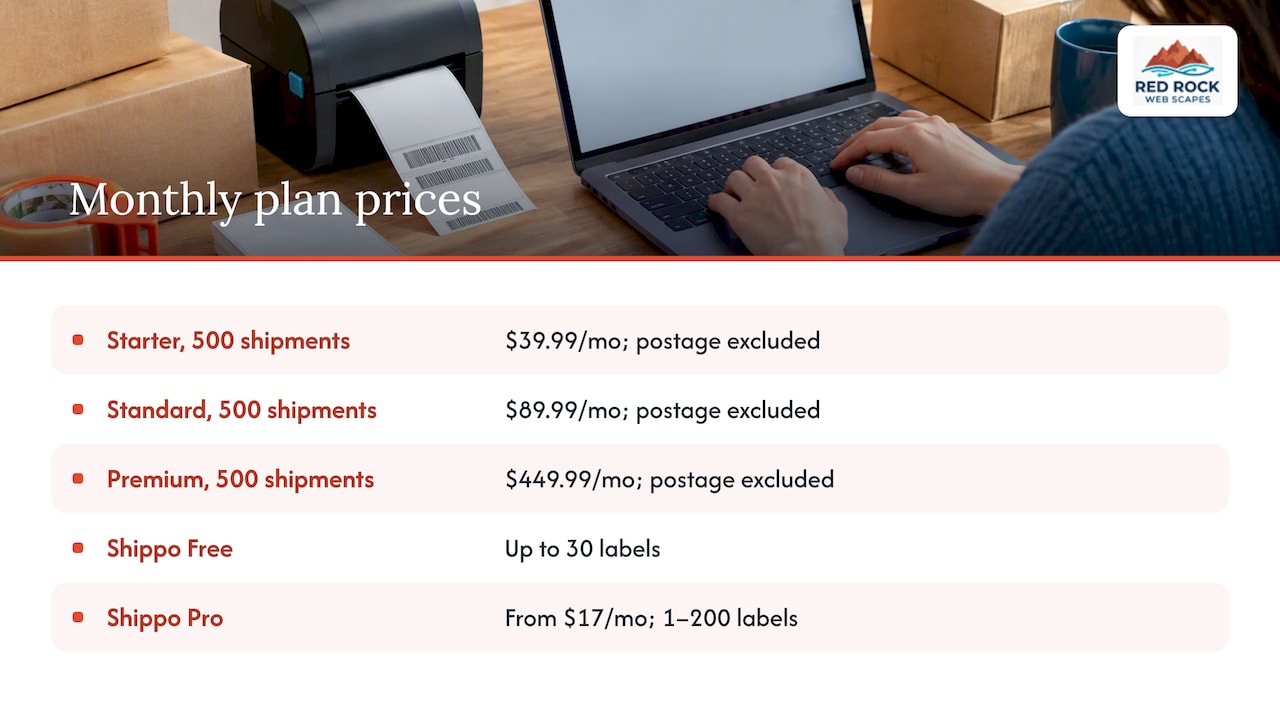
Shippo’s U.S. Starter plan is free for up to 30 labels a month. It includes discounted USPS, UPS, FedEx and DHL Express rates, unlimited store connections, international shipping, automations, return labels, tracking, reporting and email support. It comes with one user login, and connecting your own carrier account costs $0.05 per label.
The Pro plan starts at $17 a month billed annually ($205 a year) for 1 to 200 labels a month. It adds pick-and-pack tools, estimated delivery dates, branded tracking pages, notification emails, packing slips, free own-carrier-account connections, chat and phone support and up to five user logins.
If you use Shippo as an API, a separate schedule applies. The API Starter plan includes 30 labels a month free, then charges $0.07 per label, with add-ons such as $0.02 per tracking call, $0.01 per rate generation and $0.02 per U.S. address validation. Those small charges are easy to miss if your checkout requests live rates for every cart.
ShipStation pricing
ShipStation sells Starter, Standard and Premium plans. Its official pricing page shows Starter with 3 users, Standard with 10 and Premium with 15, with higher plans adding unlimited automations, returns and exchanges, API access, advanced inventory and warehouse management, custom analytics and auto-routing.
On price, one 2026 comparison lists ShipStation from $14.99 a month for 50 shipments. Another review notes that at 500 shipments a month the printed prices are $39.99 for Starter, $89.99 for Standard or $449.99 for Premium, and that neither subscription includes postage. Shippo’s free tier ends at 30 labels, and its Pro page does not state a price for the 201 to 500 label band, so ask before assuming.
A worked example
Say you ship 25 orders a month while you validate a product. On Shippo’s free Starter plan the software costs nothing, and you pay only postage. Say you grow to 150 orders. On Shippo Pro you are inside the 1 to 200 label band, starting at $17 a month on annual billing. On ShipStation you would sit in a higher shipment bracket of one of its volume-billed plans, so check the live pricing page for your exact number. At 150 orders the software cost is still small next to postage and packaging. The question becomes whether ShipStation’s extra automation saves you more time than the price difference costs.
Why Shippo can cost less
The low sticker price comes from a narrower product. Shippo Starter has a single login, simpler tooling and a free tier aimed at getting you started. Pro layers on users, branding, support and operational tools. Some API calls not tied to labels and the Estimate API are billed separately. So the cheapest plan is cheap partly because the extras are priced individually. ShipStation bundles more into its tiers, which is why its bill rises as you scale.
Carriers, rates and international shipping
Both platforms give you discounted commercial rates on the big U.S. carriers, plus tracking and return labels. ShipStation’s own comparison says both offer discounted rates, tracking and returns, but that ShipStation goes further for complex multi-warehouse and inventory needs. Keep in mind that is ShipStation describing itself.
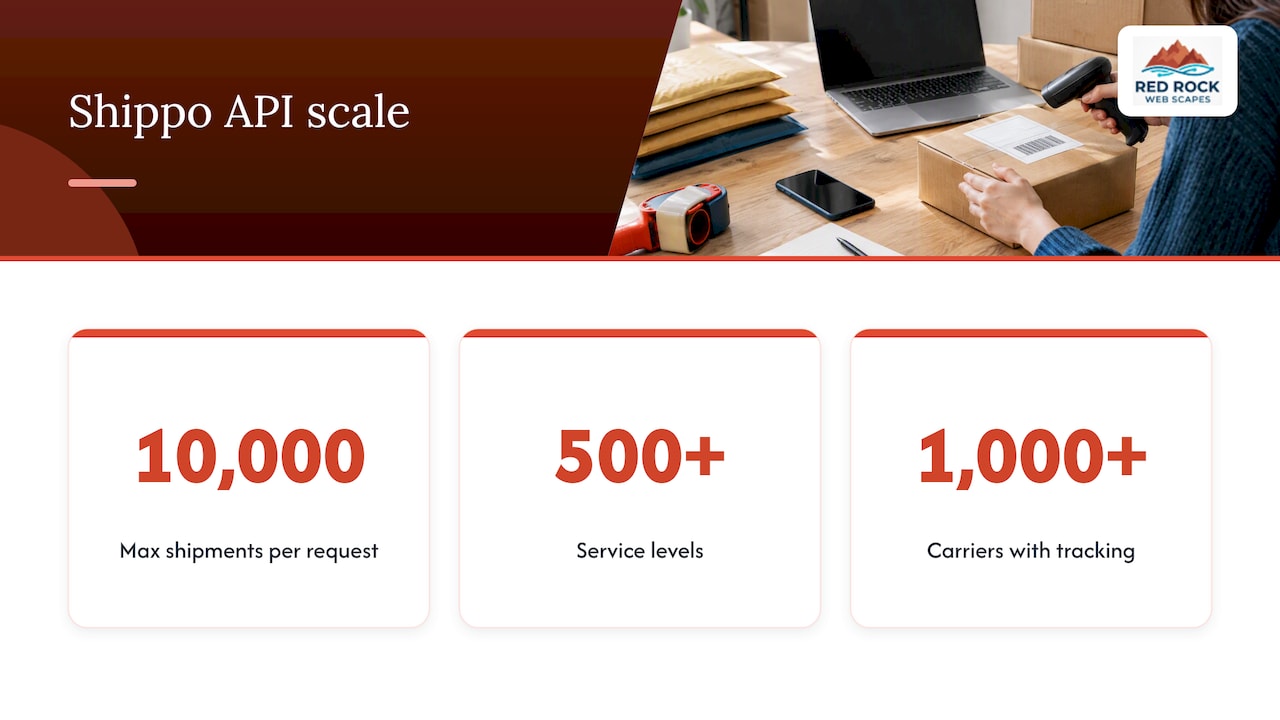
On Shippo’s side, the developer offering provides labels, live multi-carrier rating, tracking, address validation, returns and billing reconciliation. Its API supports up to 10,000 shipments in one request, with SDKs, webhooks, 500-plus service levels and tracking across more than 1,000 carriers. For a store with custom code, that is a real strength. For a store on a standard platform, you will probably never touch it.
For international shipping, Shippo’s Starter plan includes it. Whichever you choose, run a test shipment on the exact route and parcel weight you sell most. Customs forms and duties at the destination are where first-time exporters get surprised, not the software.
Automation, batch work and integrations
This is the clearest ShipStation advantage. Reviews describe ShipStation as stronger for niche integrations, advanced rules, batch processing, detailed reporting and branded returns workflows, while Shippo is easier to learn, with major e-commerce integrations and simpler automation.
What that means in practice:
- Rules. “If the order is under 1 lb, ship First Class; if it contains product X, use this box.” ShipStation handles long rule sets. Shippo’s rule engine is less suited to complex multi-warehouse routing.
- Batch printing. Printing 100 labels in one pass matters on a busy Monday. ShipStation is praised for it.
- Channels. If you sell on your own site, a marketplace and a wholesale portal, one inbox of orders saves time. ShipStation lists support for 200+ selling channels.
- Branded tracking. Both offer it. On Shippo, customizable tracking pages and notification templates sit on the higher-tier plans.
If you sell on one storefront and ship a handful of box sizes, most of these advanced features will sit unused.
Ease of use, reliability and support
Users praise Shippo for ease of use and fast onboarding, and ShipStation for automation and batch printing. Support is a weaker spot for both: reviewers report mixed support responsiveness, billing disputes and difficulty reaching live support on each platform. ShipStation users also occasionally report frustration with price changes after its acquisition and extra fees for certain carrier account integrations.
What to do with that: on Shippo, phone and chat support start with Pro, so if you expect to need a human, factor that into the plan. On either platform, screenshot your plan and billing terms when you sign up, and set a calendar reminder to review your bracket every quarter.
The disadvantages worth knowing before you choose
ShipStation:
- Cost rises with volume, and reviewers debate add-on fees at higher volumes.
- The interface assumes you will configure rules. For a new seller that is a learning curve.
- Some carrier-account connections can carry extra fees.
Shippo:
- Free and Pro tiers are limited by label counts, and the plan page leaves the 201 to 500 band unstated.
- Fewer carriers and a lighter rule engine.
- Separate per-call charges on the API side.
Both:
- Neither tool handles the physical work of picking and packing. Someone still has to find the item, box it and drop it off. If that someone is you, and it is eating your week, a trained remote assistant handling order admin can help; virtual staff in e-commerce operations is one way to take the non-physical tasks off your plate.
- Postage is billed separately.
Which one should you pick?
Ask four questions.
- How many orders a month? Under about 50, Shippo’s free tier or low Pro tier is hard to beat. In the hundreds, price both at your real volume.
- How many sales channels? One or two, either works. Three or more, ShipStation’s single order inbox earns its keep.
- Do you want to build or customize? Shippo’s API-first approach suits teams embedding shipping into their own software.
- Who is shipping? If you alone ship, simple wins. If a team picks and packs, batch printing and user seats matter, and ShipStation’s higher plans include more of them.
ShipStation’s own guidance matches this: Shippo may suit very low-volume merchants and developer-first teams, ShipStation multi-channel merchants who need order management and automation. Remember that guidance comes from ShipStation, so we check it against independent reviews, which land in the same place.
Our perspective
We build online stores for small businesses in Las Vegas and beyond, and shipping software comes up on almost every launch. Our view is that most new stores choose too much tool too early. A store doing its first few dozen orders is better off on a free or low tier, with clean shipping rules on the site itself, than on a full fulfillment suite it has not learned yet.
The bigger wins usually sit upstream of the label. Shipping rates shown at checkout, a clear policy and honest delivery estimates affect conversion more than which platform prints the label. We cover that in our guide to ecommerce shipping strategy, and the shipping step belongs on your ecommerce launch checklist as well.
So our advice: start with the simpler tool, measure your real order volume for a quarter, and move to the heavier one when rules and batch work become your bottleneck, not before. Switching later is a bother, not a disaster, as long as your store platform connects to both.
— George
Getting shipping right on your own site
A shipping platform only works well when the store feeding it is set up properly: accurate weights and dimensions on every product, sensible rate tables at checkout and an order flow that passes clean data to the label tool. That is part of what we build into our e-commerce web design for small stores, which includes Brick & Mortar builds from $2,500, E-Tail from $3,500 and Dropshipping from $4,000 (one-off, starting prices). After launch, our Website Launchpad care plans start at $79 a month for Managed Core, with Commerce Care at $199 a month.
If you want help connecting your store to the shipping tool that fits, tell us your monthly order count and channels and we will point you to the right setup.
FAQ
Is Shippo really free?
Shippo’s Starter plan is free for up to 30 labels a month, and it still includes discounted carrier rates, tracking and returns. You pay for postage, and connecting your own carrier account costs $0.05 per label. Beyond 30 labels you need a paid plan, such as Pro from $17 a month billed annually.
How much does ShipStation cost a month?
It depends on your shipment volume. Independent reviews list plans from $14.99 a month for 50 shipments, and at 500 shipments a month the printed prices are $39.99 for Starter, $89.99 for Standard and $449.99 for Premium. Postage is not included, and ShipStation’s pricing page is the place to confirm current brackets.
What are the disadvantages of ShipStation?
The main ones are a steeper learning curve and costs that grow with volume. Some users also report frustration with price changes and extra fees for certain carrier account integrations. If you ship a few orders a week from one store, you may pay for features you never use.
Is ShipStation or Shippo better for a new store?
For most new stores, Shippo. The free tier, quick setup and simpler interface suit the early weeks, when you are still learning your volume. Move to ShipStation when you sell on several channels or your rules and batch printing needs outgrow a lighter tool.
Sources
- Scalable pricing plans for your business, Shippo
- Flexible plans and pricing, Shippo API
- Your one-stop solution for shipping labels, Shippo
- Shipping API, Shippo developers
- Pricing, ShipStation
- Shipping software for ecommerce fulfillment, ShipStation
- Compare ShipStation and Shippo, ShipStation
- ShipStation vs Shippo (2026), Commercelogica
- ShipStation vs Shippo (2026), Retailpresso
- Shippo vs ShipStation (2025), The Digital Merchant
- Shippo vs ShipStation (2026): Scores, Reviews & Verdict
- Under 50 Orders? ShipStation vs Shippo, Envio3PL
- The Role of Virtual Staff in E-Commerce Operations, R3source