Choose a web app or progressive web app when reach, search visibility, and fast time to market matter most. Choose a native mobile app when you need deep device access, the highest possible performance, or a presence in the App Store. The trade-off comes down to cost and speed on one side versus device features and polish on the other, and most small businesses should start on the cheaper, faster side before committing to native.
Key Takeaways
Most small businesses should start with web or progressive web apps because they reach users faster, cost less, and are easier to maintain than native mobile apps.
| Point | Details |
|---|---|
| Web apps are platform-independent | A single web app can run across devices and operating systems without needing separate codebases. |
| Native apps excel with hardware features | Native apps provide deep device access, which is essential for hardware-dependent functions like sensors and Bluetooth. |
| Progressive web apps combine web reach with app-like features | PWAs can offer offline access, installability, and push notifications, making them a practical compromise. |
| Start with web first and measure engagement | Building a web app or PWA initially is cheaper and faster; native investments should follow validated demand. |
| Red Rock Webscapes recommends web-first approach | For most small businesses, we advise starting with web or PWA development, then scaling to native if necessary. |
Table of Contents
- What Is a Web App and When Does It Fit Your Project?
- What Is a Mobile App? Native vs Hybrid, and When Native Earns Its Cost
- Key Differences: Functionality, Performance, Cost, and Security
- Progressive Web Apps: What They Can Replace and What They Can’t
- How to Choose: A Checklist for Web App, PWA, Hybrid, or Native
- Agency Notes: How We Approach Web-First vs Native Projects
- Where Web and Mobile App Development Are Headed
- How Your Platform Choice Affects SEO and Discoverability
- A Practical Take on the Web vs Native Debate
- How Red Rock Webscapes Can Help You Build the Right Platform
- FAQ
- Sources
What Is a Web App and When Does It Fit Your Project?
A web app runs in a browser instead of living on a device as an installed program. The browser handles rendering while a server supplies data and logic, so there’s nothing to download from a store and nothing tying the experience to one operating system. You build it once and it works on a laptop, a phone, or a tablet, as long as the device has a modern browser.
This model fits a wide range of small-business needs:
- SaaS dashboards and internal admin tools that a handful of staff log into daily.
- E-commerce storefronts that need to rank in search and convert visitors who arrive from Google.
- Booking or intake forms that customers fill out once and never need to install anything for.
The distribution advantages are real. A web app is reachable the instant you share a URL, it’s indexable by search engines, and one codebase covers every platform instead of three. That last point matters for budget: building and maintaining one version costs less than native engineering for iOS and Android separately. A newer category, the progressive web app, pushes this further by adding installability and offline support without asking users to visit a store, which we cover in detail further down.
What Is a Mobile App? Native vs Hybrid, and When Native Earns Its Cost
A mobile app is something a user installs from the App Store or Google Play before it runs on their device. Under that umbrella sit two very different builds. A native app is written specifically for one platform (Swift or Objective-C for iOS, Kotlin or Java for Android), which gives it direct access to the operating system’s APIs and hardware. A hybrid app wraps web code in a native shell so it can be distributed through a store while sharing more code across platforms, trading some performance and polish for lower build cost.
Distribution mechanics differ sharply from the web. Store listings give you discoverability through search and curated placement, but you’re subject to review, a cut of in-app purchases, and update delays while a new build gets approved.
Native makes sense in specific situations:
- The product depends on hardware features like advanced camera controls, Bluetooth peripherals, or sensors that a browser can’t reliably reach.
- Users will open the app daily or weekly, making the extra investment pay off through retention.
- The experience needs platform-specific interaction patterns that a web wrapper can’t replicate convincingly.
Key Differences: Functionality, Performance, Cost, and Security
Comparing web and native head to head only makes sense dimension by dimension, because the “winner” changes depending on what you’re optimizing for.
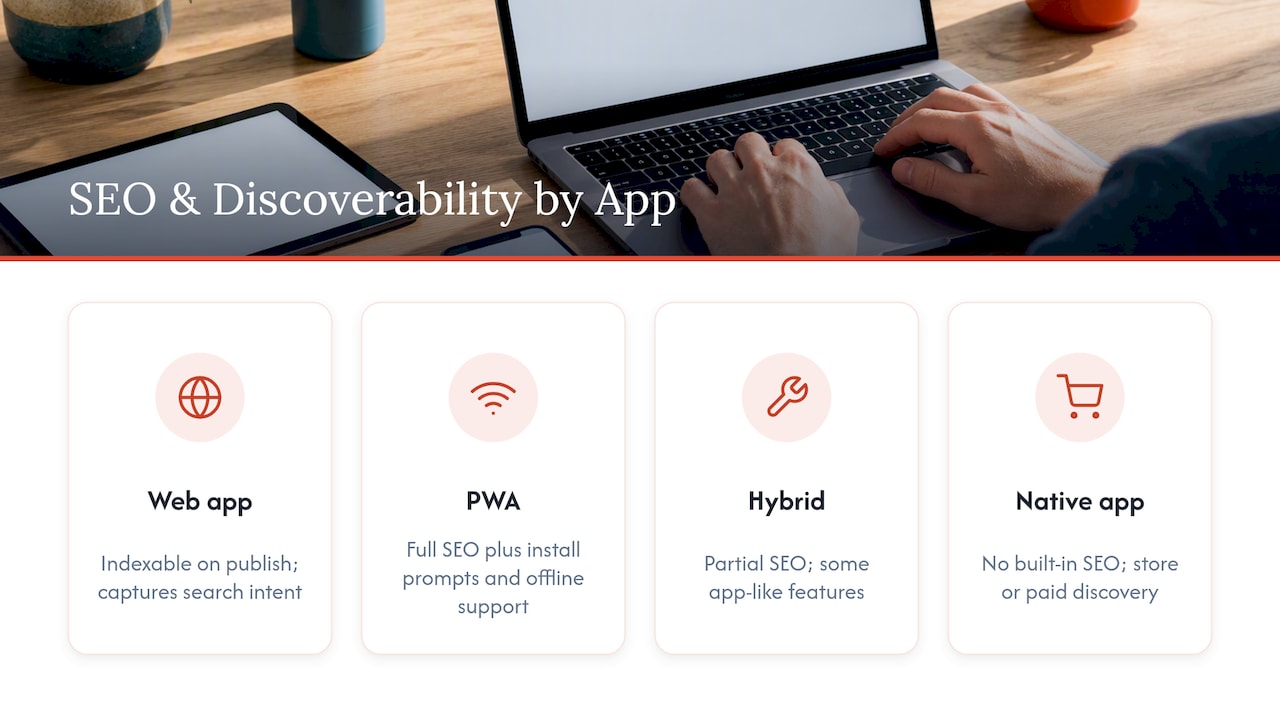
- Functionality and device access. Native apps get first-class access to background location, advanced camera modes, Bluetooth, and other hardware APIs. Web and PWA builds can reach many of these through newer browser APIs, but coverage is inconsistent across browsers and operating systems, so hardware-heavy features still lean native.
- UX and performance. Android’s developer guidance recommends targeting 60 frames per second to avoid visible stuttering, and treats startup time and responsiveness as core quality signals. Native apps hit these targets more consistently because they compile to platform-specific code, while web apps depend on network speed and browser rendering for that same snappy feel.
- Offline and background work. Service workers let a web app intercept network requests and serve cached content even without a connection, according to MDN’s PWA documentation, which covers a meaningful share of offline use cases. Native apps go further with true background processing, and genuinely offline-first architecture, treating local storage as the source of truth with its own sync and conflict-resolution logic, as Android’s offline-first guidance lays out, adds real engineering complexity on either platform.
- Distribution and discoverability. Web apps are found through search and shared links; native apps are found through store search and featured placement. Each channel carries its own friction: SEO work for the web, review delays and store fees for native.
- Development cost and time to market. One web codebase reaches every device at once, while native development usually means separate iOS and Android builds, each with its own release cycle. That difference shows up directly in budget and launch timeline.
- Maintenance and analytics. Web apps let you ship a fix and have every user on the new version instantly. Native updates wait on users to download them, which complicates bug triage and makes usage analytics trickier to interpret during rollout.
- Security and privacy. Android’s privacy guidance recommends limiting permissions to what a feature actually needs and avoiding non-resettable device identifiers. Native apps request granular permissions at the OS level; web apps generally request less and operate inside the browser’s own sandbox, which is a simpler trust model for users to reason about.
Pro Tip: Before committing to native, log which device features your idea truly depends on. If the list is short, a web app or PWA likely covers it at a fraction of the cost.
Progressive Web Apps: What They Can Replace and What They Can’t
A progressive web app is a website that behaves like an installed app once it adds two pieces: a web manifest describing how it should look and launch, and a service worker handling caching and offline logic. Together they let a browser offer an “install” prompt that puts an icon on the home screen, according to MDN’s installability guide, though browser support for that prompt still varies by platform.
Once installed, a PWA can genuinely match a lot of what people expect from native:
- Home-screen presence and a standalone window without browser chrome.
- Offline access to previously cached pages and data.
- Push notifications, though implementation and limits differ by browser.
- One build serving every device instead of three separate ones.
**A PWA that nails installability and offline caching can cover most of what a small-business app needs to do, according to MDN’s best-practices guide, which also notes that native apps still hold the edge for background processing and deep hardware control. The same guidance warns that App Store reviewers reject apps that are just thin wrappers around a website, so a PWA rarely doubles as a legitimate store listing without added platform-specific value.
A PWA is the strongest compromise when you want installability and offline reliability without the cost of two native builds, especially for an early product where you’re still validating demand before justifying a bigger investment.
How to Choose: A Checklist for Web App, PWA, Hybrid, or Native
Run through these questions in order and the right platform usually becomes obvious before you reach the end of the list.
- Where does your audience already spend time? If they’re searching Google or clicking links, start on the web; if they live inside app stores, weigh native or hybrid more seriously.
- Do you need hardware features a browser can’t reach? Advanced camera control, Bluetooth accessories, or sustained background tracking point toward native.
- Does the product depend on offline reliability? Occasional offline caching fits a PWA; mission-critical offline-first behavior with sync and conflict resolution leans native.
- What’s the real budget and timeline? One web codebase is cheaper and faster to ship than two native builds released on separate schedules.
- Do you actually need App Store presence? Store placement helps with discovery and trust signals, but it adds review cycles and ongoing compliance with platform guidelines.
The most common pitfall is committing to a full native build for an unproven idea. Spending months and a large budget on iOS and Android before you know whether people want the product is a classic way to burn runway on an MVP that should have shipped as a web app in weeks.
Pro Tip: Build the core flow as a web app first, measure real usage, then decide if the numbers justify a native rewrite.
Agency Notes: How We Approach Web-First vs Native Projects
For most small-business e-commerce clients, we recommend starting web-first or with a PWA because it reaches search traffic faster and costs less to launch than native. We reserve native recommendations for businesses with proven, frequent mobile engagement or a genuine hardware dependency that a browser can’t satisfy. Our Website Launchpad program and its managed care plans handle hosting, updates, and support after launch, so you’re not left maintaining infrastructure alone once the site is live.
Where Web and Mobile App Development Are Headed
Browser capabilities keep closing the gap with native, as both Android and iOS expose more APIs to installed web apps each year. Expect PWAs to keep gaining ground for business tools, internal apps, and storefronts where speed to market outweighs the need for deep hardware access.
At the same time, native development isn’t going away for products built around hardware, sensors, or sustained daily engagement, and platform guidance keeps raising the bar there. Android’s App Performance Score combines dynamic and static testing to flag startup, rendering, and stability issues, pushing native teams toward measuring performance earlier instead of treating it as a late-stage concern.
For small businesses and indie developers, the practical shift is toward starting cheap and web-based, then layering in native investment only once usage data justifies it. AI-assisted development is also compressing timelines on both sides, letting a single developer or small team ship a working web app in days rather than weeks, which lowers the cost of testing an idea before deciding whether it deserves a native build at all. That shift favors a web-first default even more strongly than it did a few years ago, because the fallback option of testing cheaply and failing cheaply no longer carries much of a time penalty.
How Your Platform Choice Affects SEO and Discoverability
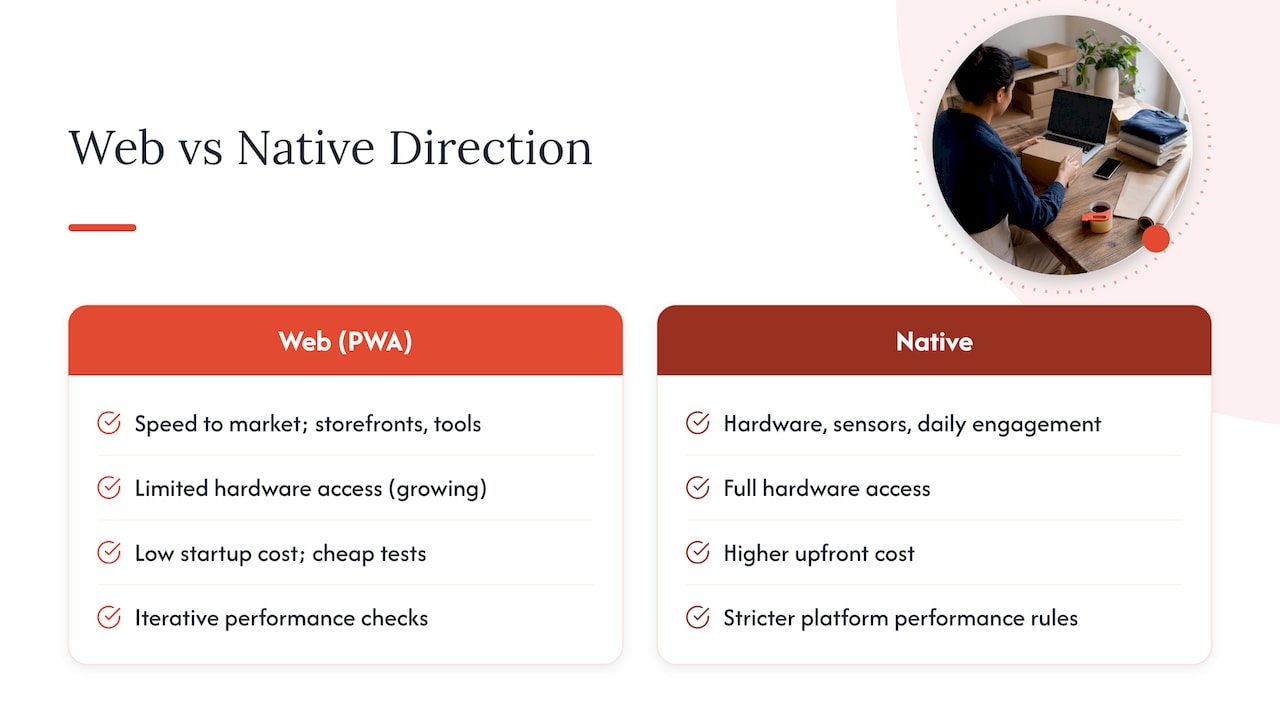
A web app is indexable by search engines the moment it’s published, so people can find your product through an ordinary Google search without ever hearing about it first. A native app has no equivalent built-in discovery channel. It depends entirely on store search, paid placement, or someone already knowing to look for it by name.
This gap matters most for businesses that rely on organic demand, like a local service business or an e-commerce storefront where customers are actively searching for a product category rather than a specific brand. A web app captures that search intent directly; a native-only app misses it entirely unless you’re also running a companion website.
Hybrid and PWA builds split the difference well. Because a PWA is still a website at its core, it keeps full SEO value while adding install prompts and offline support on top, letting you capture search traffic and still offer an app-like experience. For most small businesses weighing the two, that combination of SEO reach and lower build cost is a strong argument for starting web-first and layering in native only where the data supports it.
A Practical Take on the Web vs Native Debate
Most small businesses overthink this decision because they imagine mobile app for prestige before checking whether it solves a real problem. I’d start everyone on a web app or PWA by default, prototype fast, measure actual usage, and only move to native once the numbers show sustained engagement that justifies the extra build and maintenance cost.
— George
How Red Rock Webscapes Can Help You Build the Right Platform
We build web and app experiences tailored to your goals to find the best platform for your project. For a small-business storefront or service site, our packages range from Launch through Signature builds, and our Website Launchpad program keeps upfront costs low while managed care plans cover updates after launch.
When a project genuinely needs a native or hybrid build, our app design and development services cover everything from Design + Development to Design + Handoff, so you get a scoped recommendation instead of a one-size-fits-all pitch. If you’re still deciding which route fits, our team can walk through your goals and recommend a starting point.
FAQ
Is Facebook a web app or mobile app?
Facebook exists as both: a native mobile app distributed through the App Store and Google Play, and a web app accessible through any browser. The two share functionality but run on separate codebases optimized for their respective platforms.
Is a web application the same as a mobile application?
No. A web application runs inside a browser and requires no installation, while a mobile application is downloaded and installed from an app store before it runs directly on the device’s operating system.
Can a web app be a mobile app?
A web app can behave like a mobile app once it becomes a progressive web app, adding a manifest and service worker so it can be installed and used offline, according to MDN’s PWA guidance. It still isn’t a native app and won’t typically appear in app store search results on its own.
What is the difference between a mobile app and an online app?
A mobile app is installed on a device and can work fully or partially offline, while an “online app” (commonly a web app) runs in a browser and generally needs an internet connection unless it’s built as a PWA with offline caching. The core difference is installation and where the code actually runs.
How do I know if my small business needs a native app?
You likely need native only if your product depends on hardware features a browser can’t reach, or if you already have evidence of frequent, sustained mobile engagement. For most new small-business ideas, starting with a web app or PWA first and validating demand before investing in native is the lower-risk path, a point echoed in Apple’s App Store guidance warning against apps that add no platform-specific value beyond a website. For broader guidance on choosing a development partner for either route, see this guide to choosing a web design company.
Sources
- What great technical quality looks like | App quality | Android Developers
- Installing and uninstalling web apps – Progressive web apps | MDN