The fastest, most reliable way to get leads flowing into your CRM is to embed a CRM-hosted form on your site or connect your existing form software through a middleware tool like Zapier for simple needs, then graduate to a direct API or webhook connection once you need custom routing or scale. Done right, every submission lands in your CRM automatically, gets tagged by source, and triggers a follow-up sequence without anyone touching a spreadsheet.
Key Takeaways
Embedding CRM forms or connecting via APIs ensures reliable, automated lead capture directly into your CRM, with control over data flow and automation flexibility.
| Point | Details |
|---|---|
| Use native CRM forms | Embed CRM-hosted forms for quick setup and minimal cost but with limited design options. |
| Leverage middleware tools | Connect existing forms through platforms like Zapier for a balance of control and ease, suitable for businesses with established sites. |
| Opt for direct API or webhook integration | Build custom connections for maximum control and reliability, ideal for high-volume or complex workflows. |
| Follow a step-by-step deployment process | Inventory forms, map fields, secure connections, and test thoroughly before going live to prevent data issues. |
| Partner with experienced developers when needed | Small businesses benefit from managed services to ensure security, proper setup, and reliable performance. |
Table of Contents
- Integration Approaches: Native Forms, Plugins, Middleware, and APIs
- Step-by-Step Implementation Checklist for CRM Website Integration
- Platform-Specific Notes for WordPress, Shopify, and Wix
- Security and Vendor Oversight for Customer Data
- Testing, Measurement, and Troubleshooting Checklist
- Why a Managed Partner Makes Sense for Small Teams
- Speed, Security, and the Maintainability Trade-Off
- Get Your CRM Integration Built Right the First Time
- FAQ
- Sources
Integration Approaches: Native Forms, Plugins, Middleware, and APIs
Picking the right method comes down to how much control you need versus how fast you want to launch. A CRM-hosted form, the kind you copy and paste as an embed code, is the quickest option because the CRM handles field validation, spam filtering, and record creation for you. It works well for a basic contact page but gives you less control over design and page speed.
Plugins and app-store connectors sit one step up. WordPress form plugins and Shopify apps that sync to a CRM handle the data transfer without requiring you to write code, and most include basic field mapping out of the box. They are a reasonable middle ground: faster than custom development, more flexible than a bare embed.
Middleware platforms like Zapier or Make connect your existing form software to your CRM through pre-built triggers and actions. You keep your own form design and still get automated record creation, which makes middleware a popular choice for businesses that already have a site built and don’t want to touch the backend.
Direct API or webhook connections give you the most control. A webhook fires the moment a form is submitted, pushing data straight into the CRM through its API, and HubSpot’s developer documentation shows how date-based API versioning keeps these endpoints stable as you build on them. This route suits businesses with custom lead-scoring logic, multiple forms feeding different pipelines, or a need for reliability at volume.
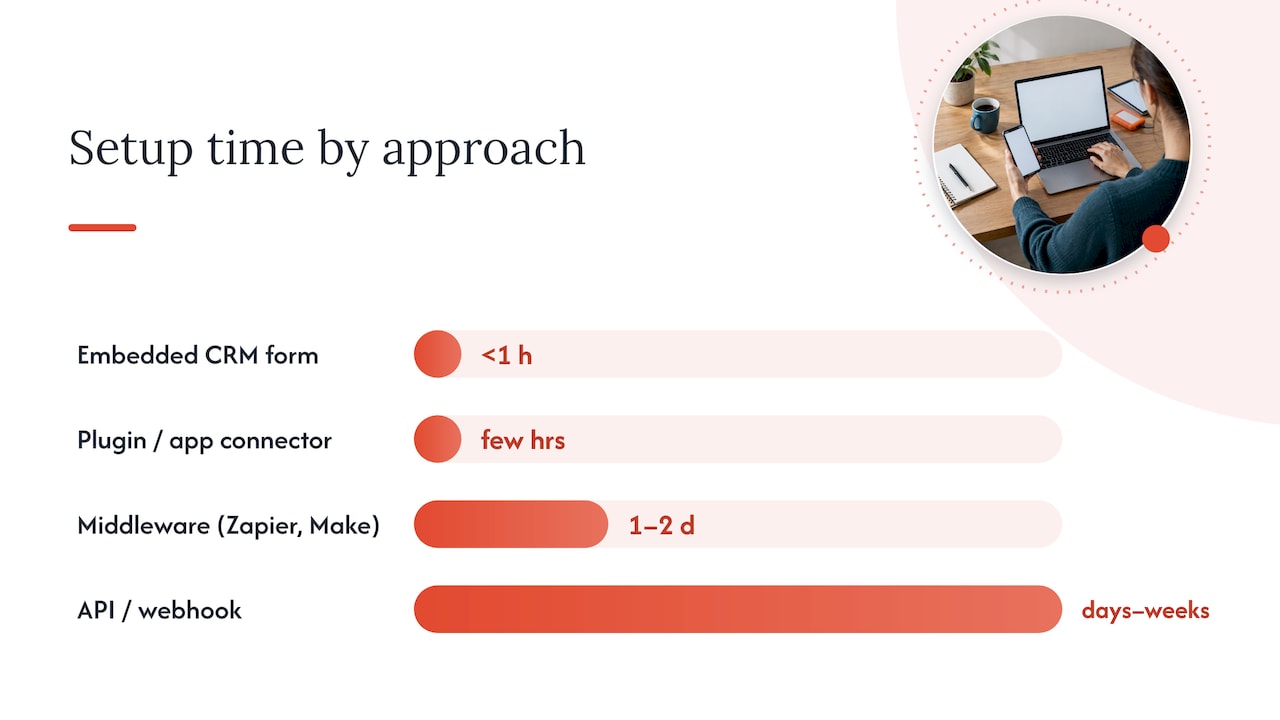
- Embedded CRM forms: fastest to set up, minimal cost, limited design control.
- Plugins or app connectors: low-code, moderate setup time, good for single-platform sites.
- Middleware (Zapier, Make): no coding required, modest monthly fee, flexible but adds a dependency layer.
- Direct API or webhook: highest setup effort and cost, best long-term reliability and control.
Cost and time scale with complexity. A basic embed can go live in under an hour. A middleware connection typically takes a day or two to configure and test. Custom API work, by contrast, can run from several days to a few weeks depending on how many fields, triggers, and systems are involved.
Step-by-Step Implementation Checklist for CRM Website Integration
A methodical rollout prevents the two most common failures: messy data and broken automations. Work through these steps in order.
- Inventory every form on your site and decide which fields you actually need. Fewer fields mean higher completion rates and cleaner data.
- Map fields to your CRM schema, including email, name, lead source, campaign, and any lead-scoring field you plan to use.
- Choose your integration method based on the options above, then obtain the credentials you need, API keys, OAuth tokens, or a webhook endpoint URL.
- Apply baseline security controls: TLS on every page that collects data, limits on which sensitive fields you capture, and access controls on who inside your team can view raw submissions.
- Configure automations for lead routing, internal notifications, and an initial nurture email or task assignment.
- Test with sample submissions, checking for duplicate records, broken field mapping, and silent errors before you rely on the integration.
- Set a realistic timeline: a simple embedded form can be live the same day, while a custom API integration with multiple triggers often takes one to three weeks.
Pro Tip: Build your field map in a spreadsheet before you touch any settings. It catches mismatches that are far more annoying to fix after a hundred leads have already come in with the wrong label.
HubSpot’s Forms API documentation shows how externally hosted forms can submit data into CRM records, which is useful reference material if you’re deciding between an embedded form and a server-side submission from your own page.
Platform-Specific Notes for WordPress, Shopify, and Wix
Your CMS shapes which integration path makes sense. Each platform has its own strengths and quirks worth knowing before you start building.
- WordPress: Use a reputable form plugin that supports webhook or API connections natively, and prefer server-side form submissions over client-side JavaScript posts to avoid CORS and authentication headaches.
- Shopify: Decide between a CRM app from the Shopify App Store and a direct webhook or API connection for customer and draft-order data; apps are faster to install, but custom webhooks give you more control over which order and customer events trigger a CRM update.
- Wix and other closed builders: Check what CRM features are already built in before adding anything external; when the native tools fall short, embedding a CRM-hosted form or routing through middleware is usually easier than fighting the platform’s limited code access.
- Decision rule: embed a CRM form when speed matters most, and move to an API or webhook connection when you need tighter control over data accuracy and long-term reliability.
Server-side submissions matter more than they sound. When a form posts directly from the browser to a CRM endpoint, you lose a layer of control over error handling and retries. Routing the submission through your own server, even a lightweight script, lets you log failures and reprocess them instead of silently losing a lead. HubSpot’s CRM object API documentation includes upsert and batch examples that are worth reviewing if you’re building this layer yourself, since using an email address as a unique identifier prevents duplicate contact records.
Security and Vendor Oversight for Customer Data
Every integration point is a place where customer data can leak if it’s set up carelessly, so a few non-negotiable basics belong in every project.
- TLS/HTTPS on every form page and every API call, with no exceptions for “internal” or low-traffic pages.
- Collect only what you need: skip optional fields like date of birth or full address unless a specific workflow requires them.
- Vet your vendors: ask form, CRM, and hosting providers about encryption, patching schedules, and access controls, and put security expectations in writing in your contracts.
- Authenticate your outbound email with SPF, DKIM, and DMARC if you’re sending notifications or nurture emails from your own domain.
- Log and retain submission data only as long as you need it, and know where it physically lives so you can audit access later.
The FTC’s small-business guidance recommends requiring security expectations in vendor contracts and verifying compliance rather than taking a provider’s claims at face value, a point that applies directly to any CRM, form, or middleware vendor you connect to your site. Separately, the FTC’s cybersecurity resources for small business list TLS, email authentication, and software updates among the core items to confirm with any hosting provider before you launch. For a deeper look at setting up authenticated business email alongside your integration, see our business email setup guide.
Testing, Measurement, and Troubleshooting Checklist
A clean launch still needs verification before you trust it with real leads.
- Submit test entries, both valid and intentionally broken, to confirm the CRM accepts good data and rejects or flags bad data correctly.
- Check for duplicates by submitting the same email twice and confirming your CRM merges or updates rather than creating a second record.
- Review logs in three places: your web server, your middleware’s run history if you’re using one, and your CRM’s activity or API error log.
- Watch for common failure modes: expired API keys, mismatched field names between your form and CRM schema, and webhook retries that signal a timeout on the receiving end.
- Track ongoing metrics: capture rate, conversion from lead to qualified lead, submission-to-CRM latency, and the number of failed deliveries each week.
Our ecommerce launch checklist covers related verification steps worth running alongside your CRM testing before any public launch.
Why a Managed Partner Makes Sense for Small Teams
We build CRM integrations as part of full site builds, pairing form and API setup with hosting that includes TLS by default and business email configured to match. For small businesses without an in-house developer, this removes the trial-and-error of picking a method and testing it alone. We run a process through discovery, build, QA, and launch, with managed care options afterward for teams that want ongoing support rather than a one-time handoff. It’s the right call when security oversight and a fast, correct launch matter more than doing it piecemeal.

Speed, Security, and the Maintainability Trade-Off
The biggest mistake we see is stacking plugin after plugin to patch gaps, which creates a fragile site that breaks with every update. A quick launch matters, but it’s worth choosing one stable integration path from the start, ideally an API-based one if you expect your lead volume or workflows to grow. Stability beats speed the moment your business depends on the data showing up correctly.
— George
Get Your CRM Integration Built Right the First Time
Setting up forms, APIs, and security correctly takes time most small business owners don’t have, and that’s exactly the gap our Website Launchpad program is built to close: a low upfront cost path to a fully built site with CRM capture, hosting, and support already configured.
If you’d rather see the full range of build options first, our packages page outlines what’s included at each tier, from a basic business site through a custom e-commerce build. Either way, the next step is the same: a short discovery call to scope your forms, your CRM, and your timeline, so the integration gets built once and works the way you expect from day one.
FAQ
What is a CRM integration with a website?
A CRM integration with a website connects the forms on your site directly to your customer relationship management system, so every submission automatically creates or updates a contact record instead of requiring manual entry. This typically includes routing rules and notifications that fire the moment a lead comes in.
What are some good CRM tools for a website?
Widely used options include HubSpot, which publishes detailed developer documentation for its forms and contact APIs, along with other platforms that offer native website form integrations or app-store connectors for WordPress and Shopify. The right choice depends on whether you need a simple embedded form or deeper API access for custom workflows.
Does Wix have an integrated CRM?
Wix includes basic built-in contact and lead management features, but many small businesses still connect an external CRM through an embedded form or a middleware tool like Zapier when they need more advanced automation. Checking what’s natively available before adding an external tool helps avoid duplicate systems.
Will CRM be replaced by AI?
AI tools are increasingly built into CRM platforms to help with lead scoring, data entry, and follow-up suggestions, but CRMs themselves remain the system of record for customer data and relationships. Rather than replacing CRMs, AI is becoming a feature layered on top.
Sources
- Start with Security: A Guide for Business | Federal Trade Commission
- 2026-09 API reference – HubSpot docs