Complete, accurate profile data, fresh photos, and a steady stream of reviews do more for your ranking than any other combination of actions. This guide walks through a checklist, field-by-field instructions, and a 30/60/90 day plan and shows how to use Google’s Profile Strength Indicator and Gemini to prioritize your time. For businesses that want a managed option, Red Rock Webscapes also offers this as a service.
TL;DR:
- Verifying your profile and completing all core fields, especially name, address, hours, and description, is essential before focusing on photos or reviews.
- Uploading high-quality, varied photos monthly and refreshing your image set helps improve visibility and customer trust.
- Requesting reviews from recent satisfied customers without incentivizing and replying within 48 hours boosts your credibility and engagement signals.
- Prioritizing specific categories and clearly naming services in customer search terms enhances your chances of ranking higher in relevant searches.
- Ongoing optimization through regular posts, data review, and profile updates, possibly supported by managed services, sustains and improves local search performance over time.
Table of Contents
- High-impact checklist: tasks to prioritize now
- Complete every profile field: name, address, hours, and description
- Choosing categories and writing Services that Google can match
- Photos and video: what to upload first and how often to refresh
- Reviews: how to get more and handle the ones that go wrong
- Posts, products, and action links that convert views into visits
- Verification, eligibility rules, and how to appeal a suspension
- Insights, Profile Strength, and Gemini: what to watch and how to prioritize
- A 30/60/90 day roadmap for ongoing optimization
- Managed option: how Red Rock Webscapes supports Google Business Profile optimization
- Where the effort pays off first: an editorial take
- Get a hand with your profile: Red Rock Webscapes’ GBP and web packages
- Sources
- FAQ
High-impact checklist: tasks to prioritize now
Before diving into the details, work through this list in order. Each item is ranked by how much it tends to move visibility relative to the time it takes.
- Verify your profile if it is not already verified; unverified listings cannot access Profile Strength suggestions.
- Fill in every core field: name, address or service area, hours, phone, website, and description.
- Set accurate regular hours and add special hours ahead of holidays.
- Choose the most specific primary category available, then add relevant secondary categories.
- Add a Services list with clear, plain-language names for what you offer.
- Upload quality photos covering exterior, interior, products, and team to enrich your profile.
- Request reviews from recent customers using a compliant link or QR code.
- Reply to every new review within 48 hours, positive or negative.
- Publish one post per week, whether an update, offer, or event.
- Check Insights monthly to see which searches and actions are trending.
- Turn on booking or action links if your business takes appointments or orders.
- Review the Profile Strength Indicator and fix whatever it flags as missing.
- Start with verification and the core fields; nothing else matters until these are accurate.
- Move to photos and reviews next, since both directly affect click-through and trust.
- Treat posts, Services wording, and Insights review as ongoing maintenance, not one-time setup.
Google itself frames complete and consistent profile data alongside frequent photos and active review management as the core levers for local ranking. Everything else in this guide builds on that foundation.
Complete every profile field: name, address, hours, and description
Google rewards accuracy over cleverness, and most profile problems come from small shortcuts owners take when filling in fields quickly.
Business name. Use your real-world name exactly as it appears on your storefront, invoices, and signage. Do not append keywords like “best” or a service description. Google’s guidance treats keyword-stuffed names as a policy violation that can trigger suspension rather than a ranking boost.
Address versus service area. If customers visit you at a fixed location, list your full street address and make sure it matches your signage. If you travel to customers instead, hide your address and set a service area defined by cities or zip codes. Mixing the two, such as showing an address while also claiming a citywide service area for a business that has no public storefront, is one of the more common eligibility problems.
Hours and special hours. Set your regular weekly hours precisely, down to the minute if your close time is not a round number. Add special hours for holidays and known closures well in advance. A profile showing “open” when a customer arrives to a locked door does more damage to trust than a profile that simply lists shorter hours.
Description. Your “from the business” description gets one shot at a first sentence, so make it a clear semantic statement: subject, what you do, who you serve. For example, “Red Rock Coffee Roasters roasts and sells small-batch coffee to home and office customers across the valley” tells both readers and Google’s systems exactly what the business is, immediately.
- Lead with what the business is and does, not with a slogan.
- Mention your specialty and service area in the first two sentences.
- Avoid repeating the same keyword phrase more than twice in the full description.
- Skip promotional language like “best” or “top rated,” since it reads as filler, not information.
Contact and website. List a working phone number that rings to a person, not a general voicemail tree, and link to your actual website rather than a social media profile or marketplace listing.
Pro Tip: Copy your business name, address, and phone number exactly as they appear on your Business Profile onto your website footer. Inconsistent details across the web are a common cause of ranking problems.
Choosing categories and writing Services that Google can match
Your primary category should describe what your business is, not what it does. A bakery that also does custom cake orders is still a bakery, not a “cake design service,” because Google matches categories to search intent, not to your marketing angle.
Start by picking the single most specific primary category the list offers. “Italian Restaurant” beats “Restaurant” every time it is accurate, because specificity narrows the competition you are ranking against. Add secondary categories only when they represent a core part of what you actually do daily, not every adjacent service you could technically perform.
Services is where the wording does the work. Add each service with a short, specific name a customer would actually type into a search bar, followed by a one or two sentence description. According to Whitespark’s local ranking research, the presence and wording of Services entries has grown in importance for both traditional local rankings and newer AI-driven search results.
- Name services the way customers search, such as “Emergency Drain Cleaning” instead of “Plumbing Solutions.”
- Write a short description for each service that includes what it covers and, where relevant, who it is for.
- Avoid listing services you rarely or never actually perform, since mismatched Services entries hurt trust signals over time.
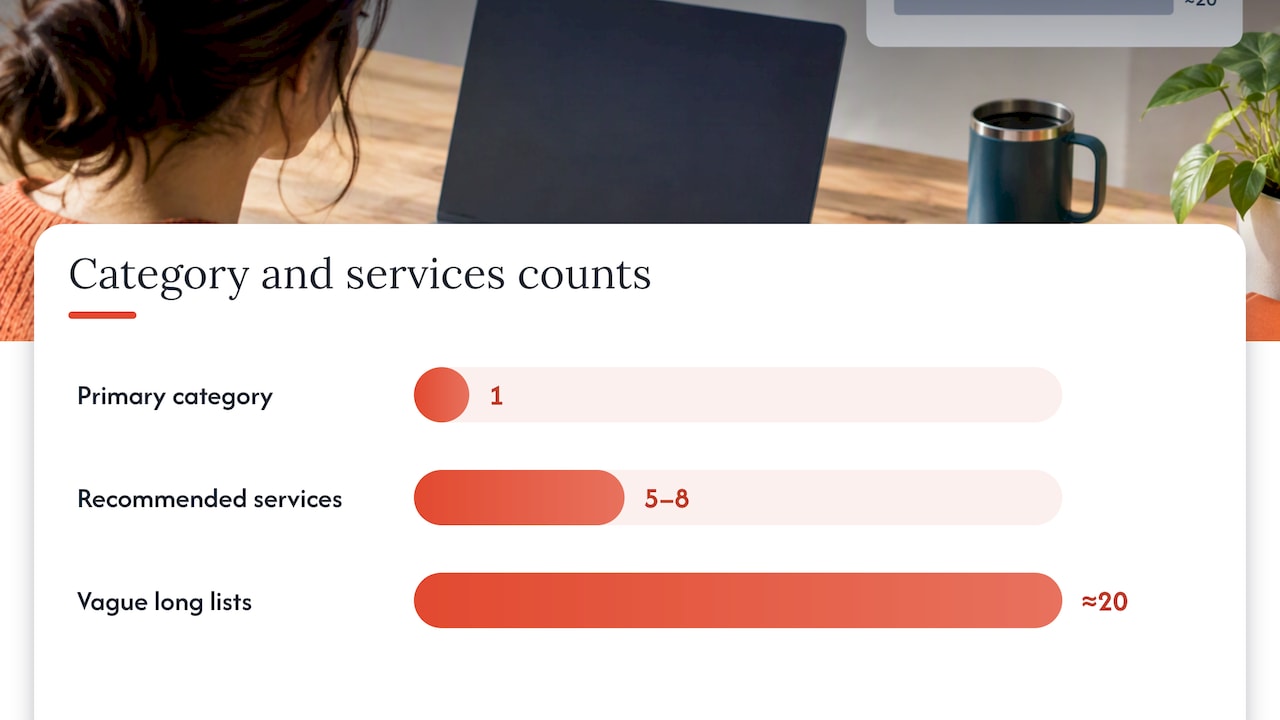
- Keep the list focused: five to eight well-described services usually outperform twenty vague ones.
Over-optimizing here backfires. Stuffing service names with repeated keywords or listing every possible variation of a service reads as spam to both users and Google’s systems.
Photos and video: what to upload first and how often to refresh
Profiles with recent, varied photos consistently draw more attention on Search and Maps than profiles running on old or stock imagery. Upload in this order of priority: a clear cover photo, your logo, exterior shots showing the storefront and signage, interior shots, team photos, product or menu photos, and, where relevant, photos showing your process at work.
- Use landscape images where possible, since they display better across Search and Maps.
- Name image files descriptively before uploading, such as “red-rock-coffee-storefront.jpg” rather than a generic camera file name.
- Add a short caption to each photo describing what it shows and where.
- Avoid heavily filtered or staged images; natural lighting photos taken on a recent phone camera tend to perform just as well as professional shoots.
Refresh your photo set at least monthly, and add new images any time you change your menu, renovate, or bring in new products. Short videos, ten to thirty seconds, work well for showing a space in motion or demonstrating a product, and Google increasingly surfaces video alongside photos in profile previews.
Captions matter for more than accessibility. They give Google’s systems text to match against search queries, which means a well-captioned photo can help your profile surface for searches a plain image never would.
Pro Tip: Batch your photo updates once a month rather than uploading everything at once and then going quiet for a year. Steady, small additions read as an active business.
Reviews: how to get more and handle the ones that go wrong
Reviews are the fastest-moving trust signal on your profile, and they are also the one most businesses mishandle by either asking too aggressively or not asking at all.
- Build a simple request workflow: send your direct Google review link or a printed QR code to customers right after a positive interaction, whether that is at checkout, via text, or in a follow-up email.
- Never offer a discount, freebie, or any other incentive in exchange for a review. Google’s guidance on getting more reviews explicitly prohibits incentivized reviews, and violations can lead to review removal or profile penalties.
- Follow up once, politely, about a week after the service if no review has appeared, then let it go.
- Reply to every review, positive or negative, ideally within 48 hours. A short, specific reply to a good review (“Thanks for calling out our weekend crew, we’ll pass that along”) reads as more genuine than a generic thank you.
- For negative reviews, acknowledge the specific issue, avoid defensiveness, and offer to continue the conversation offline through phone or email.
- If a review violates policy, such as containing hate speech, an obvious fake, or content from someone who was never a customer, flag it through Google’s reporting tool and keep screenshots and any supporting records as evidence.
Track review velocity (how many you get per month), your average rating, and your reply rate. A business that replies to every review within two days sends a stronger signal of active management than one with a higher rating but silent owner.
Pro Tip: Ask for the review at the exact moment satisfaction peaks, not days later when the memory has faded and the motivation with it.
Posts, products, and action links that convert views into visits
Google Business Profile supports several post types, and using the right one for the moment matters more than posting frequency alone. Use an Update post for general news like new hours or a seasonal menu item, an Offer post when you have a specific, time-bound discount, and an Event post for anything with a start and end date, like a seasonal sale or in-store class.
- Write post copy the way you would a short text message to a regular customer, direct and specific, not like an ad headline.
- Use Product listings when you have a defined catalog, such as retail items or fixed-price services, including a clear name, price, and one photo per item.
- Set up booking or order action links if your business takes appointments or online orders directly from the profile.
- Add a tracking parameter or a dedicated phone number to action links so you can see how much traffic and how many calls originate from the profile itself.
- Schedule posts in advance where your management tools allow it, but keep at least one manual post per month tied to something current, like a real event or a seasonal change.
Compare Insights data before and after a run of posts to see whether views and actions moved. A quiet month with no posts followed by a month with four typically shows the lift clearly enough to justify the habit.
Verification, eligibility rules, and how to appeal a suspension
Verification confirms you are the legitimate owner or manager of the business, and it unlocks the Profile Strength Indicator along with full editing access.
- Start verification as soon as you claim the profile. Common methods include a postcard mailed to your business address, a phone or text code, email verification, or video verification for certain business types.
- Make sure your listing meets Google’s eligibility rules before you submit: a real, staffed location or documented service area, visible signage where applicable, and no PO boxes used as your primary address.
- Know the most common suspension triggers: a mismatched name, address, or category, use of a residential address without proper disclosure, duplicate listings, or reviews and photos that violate content policy.
- If your profile is suspended, use Google’s appeals tool right away. Google’s suspended profile guidance lists documents that strengthen an appeal, including business licenses, utility bills showing your business address, and official registration paperwork.
- Submit clear, legible copies of that documentation the first time rather than a partial set, since incomplete appeals tend to take longer to resolve.
Some verification steps, particularly video verification for service-area businesses, benefit from having someone technically capable on hand to manage the recording requirements; a managed IT partner like NEXTmsp can help businesses that need that kind of support.
Pro Tip: Keep a folder, physical or digital, with your business license, a recent utility bill, and proof of address ready at all times. If you ever need to appeal a suspension, having that evidence ready cuts the wait significantly.
Insights, Profile Strength, and Gemini: what to watch and how to prioritize
Three Insights metrics matter more than the rest: which search queries bring people to your profile, what actions they take once there (calls, direction requests, website visits), and how many direction requests convert into visits you can track through foot traffic or bookings.
- Check Profile Strength monthly; it flags specific missing fields on verified profiles and ranks them by likely impact.
- Treat Profile Strength suggestions as a prioritized to-do list rather than a general reminder, since Google is pointing at your specific gaps, not generic advice.
- Use Gemini inside your Business Profile management tools to draft review replies, generate post copy, and summarize recurring themes across your reviews.
- Let Gemini’s proactive suggestions surface missing information you might not think to check yourself, like an outdated phone number or a category mismatch.
Profile Strength and Gemini-driven suggestions speed the discovery of missing high-impact fixes. Google’s Gemini integration can manage updates conversationally, draft replies, and flag likely problems, which turns what used to be manual guesswork into a short prioritized list.
As a quick example: if Insights shows a spike in “open Saturday” searches but your hours don’t list weekend availability, that is a clearer signal to adjust hours than to add another Services entry. Let the query data decide which fix comes first.
A 30/60/90 day roadmap for ongoing optimization
Spreading the work across three months makes it manageable instead of overwhelming, and it builds habits that carry past the initial push.
- Days 1 to 30: Verify the profile, complete every core field, upload at least 10 photos, request reviews from your five most recent satisfied customers, and publish your first post.
- Days 31 to 60: Post weekly, refine your Services list based on what customers actually ask for, and run a second round of review requests with a follow-up for anyone who hasn’t responded.
- Days 61 to 90: Test different post types to see what drives the most action clicks, ask a few regular customers to mention your business by name in local community groups, and review three months of Insights data to spot patterns.
| Timeframe | Primary focus | Owner tasks | Manager tasks |
|---|---|---|---|
| Days 1 to 30 | Setup and verification | Approve business info, sign off on description | Complete fields, upload photos, request first reviews |
| Days 31 to 60 | Consistency | Review posting calendar monthly | Publish posts weekly, follow up on reviews |
| Days 61 to 90 | Optimization | Review Insights summary | Test post types, refine Services, document evidence |
After 90 days, the work becomes monthly maintenance: check Profile Strength, add a few new photos, keep posting weekly, and reply to every review as it comes in. A small business owner who checks the profile for 20 minutes a week generally stays ahead of a business that lets it sit untouched for months at a time.
Managed option: how Red Rock Webscapes supports Google Business Profile optimization
Not every owner has the time to run this checklist every month, which is where a managed service earns its cost back. A managed service option exists with GMB Local SEO packages at multiple tiers, built around the same priorities covered above: complete profile data, consistent posting, and active review management, supported by AI-assisted workflows for drafting replies and spotting gaps faster than a manual review would.
A typical managed engagement includes a full profile audit against Google’s own guidelines, help through the verification process, guidance on what photos to prioritize, a review request workflow, a monthly post calendar, and a regular read of your Insights data to catch new opportunities as they appear.
Hiring an agency makes sense once the time cost of doing this well every month exceeds what a small team can absorb, or once a profile needs verification troubleshooting or a suspension appeal that benefits from someone who has handled the process before. A solo owner with a simple, single-location business and a few spare hours a month can often manage the checklist above without outside help.
Where the effort pays off first: an editorial take
If you only have an afternoon, spend it on three things: verifying your profile if it isn’t already, filling in every field with accurate information, and sending review requests to your last five happy customers. Those three moves, in that order, tend to produce more visible change in 30 days than anything else on this list.
The two mistakes I see most often are keyword-stuffed business names and incentivized review requests. Both feel like shortcuts, and both put the profile at risk of suspension instead of moving it forward. Google’s systems are built to catch exactly this kind of manipulation, and the penalty almost always costs more time than the shortcut saved.
Treat the profile like a living asset, not a form you fill out once. The businesses that keep updating it, even in small ways, are the ones still ranking well a year from now.
— George
Get a hand with your profile: Red Rock Webscapes’ GBP and web packages
Running this checklist alone every month is doable, but it competes with everything else running a small business demands. The ongoing work can be handled through GMB Local SEO — Basic and GMB Local SEO — High-Level packages, so your profile gets consistent attention without it becoming another task on your own list.
For businesses that also need a modern site to back up the profile, the Website Launchpad program pairs a low upfront cost site launch with a managed care plan, so your website and your Google Business Profile stay consistent with each other instead of pulling in different directions. A starting consult covers a full profile audit, a prioritized list of fixes ranked by impact, and a realistic timeline for getting your listing where it needs to be.
- Get a profile audit that flags exactly what is missing or inconsistent.
- Receive a prioritized fix list instead of a generic checklist.
- See a clear timeline before committing to ongoing management.
Check out the full package lineup to see how GBP optimization fits alongside a website refresh, or reach out directly to get a timeline for your own profile.
Sources
The guidance above draws directly from Google’s own documentation and independent local search research, listed here for anyone who wants to check the details firsthand.
FAQ
How do I optimize my Google Business Profile?
Start by verifying your listing, then complete every field accurately, including your category, hours, and description. From there, upload fresh photos regularly, request reviews from recent customers, and post weekly updates, checking your Profile Strength Indicator each month to catch gaps.
How much does Google Business Profile optimization cost?
Google Business Profile itself is free to claim, verify, and manage directly through Google. Businesses that prefer a managed approach can use a service like Red Rock Webscapes’ GMB Local SEO packages, which are priced on request rather than a fixed public rate.
How do I optimize my Google Business Profile in 2026?
The core steps haven’t changed: complete profile data, frequent photos, and active review management remain the biggest levers according to Google’s own guidance. What’s new is the growing role of Gemini-assisted tools for drafting replies and surfacing missing information, plus the added weight given to well-written Services entries in AI-driven search results.
Is Google Business Profile being discontinued?
No, Google Business Profile is an active, actively updated product, with Google continuing to add features like Gemini integration and Profile Strength suggestions. There is no indication from Google’s own documentation that the product is being phased out.