Product schema markup uses the Schema.org Product type, preferably written in JSON-LD, to make product facts explicit to search engines. Start with four properties: name, image, description, and an offers block with price, priceCurrency, and availability. Those four alone cover most of the eligibility requirements search engines check before showing enhanced product listings.
TL;DR:
- Correct schema markup, including name, description, image, and offers with price and availability, is essential for eligibility in enhanced product listings.
- Nested Offer objects must include accurate currency codes, prices, and stock status URIs to prevent validation errors and ensure proper parsing.
- Markup must precisely match visible page content, such as price, stock status, and ratings, to avoid manual review triggers and ensure search engine trust.
- Using server-side generated JSON-LD in the canonical URL, validated with Google tools, and kept updated is crucial for maintaining schema accuracy over time.
- For large product catalogs, templated schema implementation validated at launch and monitored regularly is recommended to prevent common mistakes and ensure ongoing compliance.
Table of Contents
- Why product schema matters and how search engines use it
- Core product properties to include
- Copy-ready JSON-LD example and annotated walkthrough
- Step by step: adding markup by platform
- Validate, test, and monitor your structured data
- Common mistakes and troubleshooting checklist
- When professional implementation makes sense
- Priorities for maintainable schema
- Get help implementing product schema correctly
- Authoritative references and validator tools
- FAQ
Why product schema matters and how search engines use it
Structured data and rich results are not the same thing. Structured data is the labeling you add to your HTML. Rich results are the visual treatments (star ratings, price badges, availability tags) that search engines may choose to display based on that labeling, according to Google’s Search Central documentation. Adding correct markup makes your page eligible; it does not guarantee a particular presentation.
What schema does reliably is remove ambiguity. Without it, a crawler has to guess whether “$45” on your page refers to the current price, a former price, or a shipping fee. With a properly nested Offer object, that number is tagged unambiguously as price, tied to a currency and an availability status. The same clarity helps other machine consumers, including AI systems that summarize or compare products, read your page correctly rather than inferring from surrounding text.
Nesting matters as much as the properties themselves. An AggregateRating that floats loose in your JSON-LD, disconnected from the Product it describes, tells a parser nothing useful. The Schema.org Product reference shows AggregateRating and Offer as nested children of Product, and that structure is what search engines expect to parse.
The immediate, realistic benefits of doing this well:
- Eligibility for enhanced listings like price and availability snippets, subject to each search engine’s own criteria.
- Reduced ambiguity for crawlers trying to match visible page content to a data model.
- Better machine readability for AI-driven search and comparison tools that rely on structured facts rather than parsed prose.
None of this replaces good content or accurate pricing. It just gives search engines a cleaner way to read what is already true on your page.
Core product properties to include
Not every property carries equal weight. Some are required for basic eligibility, others unlock specific enhancements, and a few only matter for barcoded retail goods.
Treat these as essential on every product page:
- name: the product title exactly as shown to shoppers.
- description: a plain summary matching the visible product copy.
- image: one or more URLs pointing to actual product photos.
- offers: a nested Offer with price, priceCurrency, availability, and url.
- sku or productID: your internal identifier for the item.
Add these when they apply and you can back them with real data:
- brand: the manufacturer or your own brand name.
- aggregateRating and review: only when you have genuine customer ratings displayed on the page.
- gtin (or the specific gtin8/gtin12/gtin13/gtin14 variant): required for most barcoded retail products in merchant listings.
- additionalProperty: for specs that matter to buyers, like material or capacity.
Guidance from Schema.org’s Product documentation shows exactly how gtin formatting and nested Offer or AggregateRating objects should be structured, which matters because malformed identifiers are a common source of validation errors.
If you sell a product in multiple sizes or colors, use ProductGroup at the parent level and list each variant as its own Product entry with its own SKU and Offer. Trying to cram every variant into a single Product node creates conflicting offers that parsers cannot reconcile.
A few formatting notes save rework later. GTIN values should be digits only, with the correct length for the gtin variant you choose. priceCurrency uses the three-letter ISO code (USD, not a dollar sign). Availability should reference the Schema.org URI, such as https://schema.org/InStock, rather than a plain word.
Copy-ready JSON-LD example and annotated walkthrough
Here is a complete, adaptable example for a single merchant product page:
{
  "@context": "https://schema.org/",
  "@type": "Product",
  "name": "Trailhead Insulated Water Bottle, 32 oz",
  "image": "https://example.com/images/trailhead-bottle-32oz.jpg",
  "description": "Double-wall insulated stainless steel bottle, keeps drinks cold for 24 hours.",
  "sku": "TH-BOTTLE-32",
  "brand": {
    "@type": "Brand",
    "name": "Trailhead Gear"
  },
  "offers": {
    "@type": "Offer",
    "url": "https://example.com/products/trailhead-bottle-32oz",
    "priceCurrency": "USD",
    "price": "34.99",
    "availability": "https://schema.org/InStock"
  },
  "aggregateRating": {
    "@type": "AggregateRating",
    "ratingValue": "4.6",
    "reviewCount": "128"
  }
}
Each field maps to something a shopper can see on the page:
| JSON-LD property | Visible page element |
|---|---|
| name | Product title heading |
| image | Main product photo |
| description | Product summary paragraph |
| offers.price | Displayed price |
| offers.availability | Stock status label |
| aggregateRating.ratingValue | Star rating display |
The rules for this example are described in the Schema.org Product type reference, which includes JSON-LD and Microdata examples showing the same nesting pattern.
For a product with variants, the top-level entity becomes a ProductGroup with a name and brand, and each color or size gets its own Product entry inside a hasVariant array, each carrying its own sku and Offer.
Two safety checks before you publish: never include private data like internal cost fields, and never state a rating, price, or availability status in your markup that does not match what the visitor actually sees on the page. Mismatches are one of the fastest ways to trigger a manual review.
Step by step: adding markup by platform
The mechanics differ by platform, but the goal is the same everywhere: one script per product page, generated from the same data that renders the visible content.
- Confirm the page is canonical. Add JSON-LD only to the final, canonical URL for each product, never to filtered or parameterized duplicates.
- Generate the script server-side. Pull name, price, availability, and identifiers from the same database fields the template uses to render the page, so the two can never drift apart.
- Insert the script tag in the head. A
<script type="application/ld+json">block in the document head is the standard placement; the body works too if your CMS restricts head edits. - On hand-coded sites, build the JSON-LD directly into your server-side template so it regenerates automatically whenever product data changes.
- On WordPress, add the markup through your theme template or a schema plugin, but check for existing plugins that might already output Product schema. Two plugins writing conflicting Product entities on the same page is a common, avoidable error.
- On Shopify or headless setups, pull values from product metafields into a server-rendered template rather than injecting schema with client-side JavaScript, since some crawlers do not reliably execute JS-only insertions.
- Re-render on every price or stock change, since stale schema is worse than no schema at all.
Pro Tip: Keep your JSON-LD generation in a single template partial or include file, so a pricing or availability change only requires updating one source of truth.
Validate, test, and monitor your structured data
Deploying markup once is the easy part. Keeping it accurate after redesigns, price changes, and plugin updates is where most sites lose ground.
- Run new or changed pages through the Google Rich Results Test to check eligibility for enhanced listings.
- Cross-check conformance against the Schema Markup Validator and the examples on Schema, which show valid nesting patterns you can compare against your own output.
- Review Search Console’s enhancement reports regularly; errors there usually point to missing required fields or type mismatches rather than cosmetic issues.
- Treat warnings about missing optional fields (like aggregateRating) differently from hard errors on required fields (like missing price), since only the latter blocks eligibility.
- For larger catalogs, add a schema linting step to your deployment pipeline and run automated checks against staging URLs before changes reach production.
The Google Search Central guidance on product structured data recommends exactly this kind of pre-deploy validation, paired with post-deploy monitoring, to catch regressions before they affect visibility.
Common mistakes and troubleshooting checklist
Most schema problems trace back to a handful of repeat offenders.
- Visible content and markup disagree. A price, stock status, or rating in your JSON-LD that does not match what the page displays is the most common trigger for manual review.
- Marking up content you do not control. Inventing reviews or ratings you have not actually collected violates the spirit of structured data and risks penalties.
- Confusing sku, productID, and gtin. These are distinct identifiers; a gtin has a fixed digit format, while sku and productID are your own internal codes.
- Orphaned Offer or AggregateRating nodes. If they are not nested inside the Product entity, parsers cannot connect them to the item they describe. Fix this by restructuring your JSON-LD so Offer and AggregateRating sit as properties of Product, not as separate top-level objects.
When professional implementation makes sense
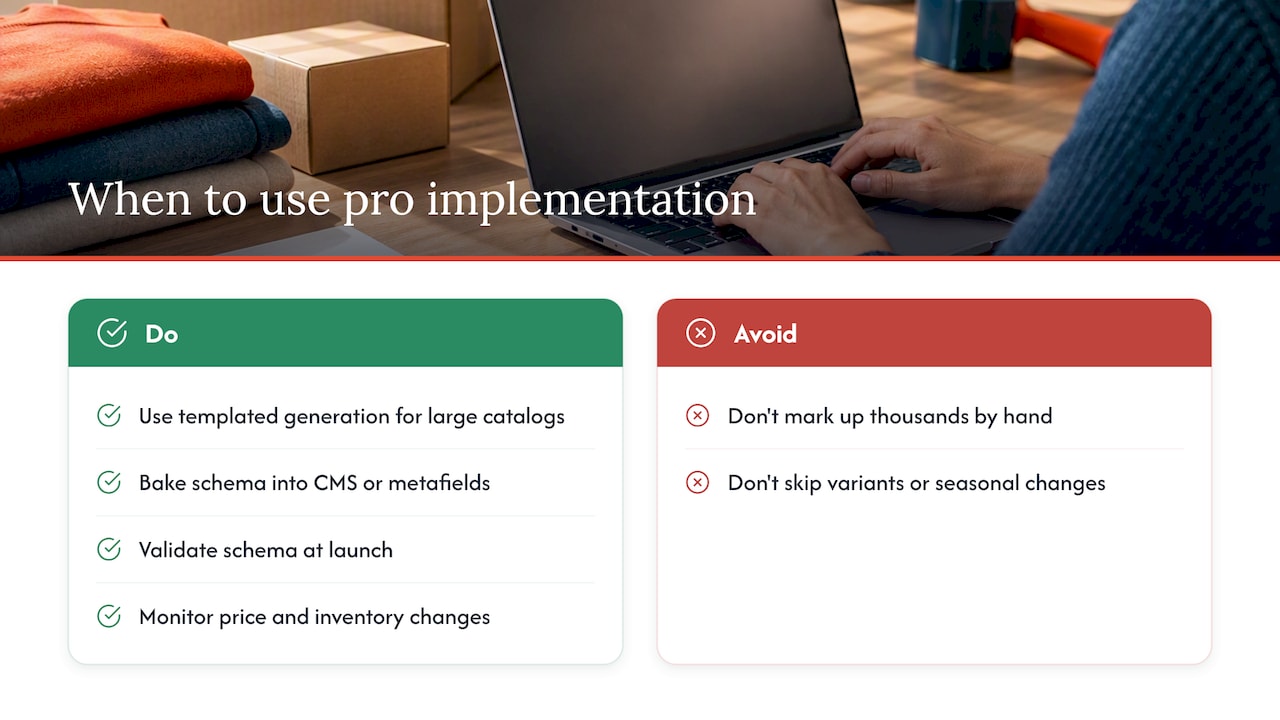
Catalog size is usually the deciding factor. A handful of product pages you can mark up and check by hand. A few thousand SKUs across variants, categories, and seasonal changes usually need templated generation tied to your product database, not manual edits.
An agency-built solution typically means schema baked into your CMS or metafield structure, validated at launch, and monitored as prices and inventory change. Some agencies build this kind of templated markup into e-commerce projects as a standard part of development, alongside broader SEO work. The rest of this guide reflects the implementation priorities George, the author, applies when reviewing schema setups for client sites.
Priorities for maintainable schema
If I had to pick one rule, it would be this: one authoritative Product entity, rendered server-side, checked by an automated validator before it ships. Big rewrites that touch every product page at once are where mismatches creep in.
Test a small batch, monitor Search Console for a week, then expand. Schema that stays accurate over time beats schema that looked perfect on launch day.
— George
Get help implementing product schema correctly
Building templated, validated schema across a growing catalog takes time most small business owners do not have. Red Rock Webscapes handles this as part of its e-commerce build services and ongoing SEO work, so your product pages stay accurate as prices and inventory change.
A discovery call typically covers:
- The size and structure of your current product catalog.
- A realistic timeline for templated schema rollout.
- A validation and monitoring plan for after launch.
Check the service packages to see which option fits your catalog size and timeline.
Authoritative references and validator tools
Bookmark these for ongoing work: the Schema.org Product type for vocabulary and examples, Google’s product structured data documentation for eligibility rules, the Rich Results Test for validation, and Search Engine Land’s schema markup guide for practical context.
FAQ
What is a schema markup?
Schema markup is a standardized vocabulary, maintained by Schema.org, that labels page content so search engines can read it as structured facts instead of plain text. It covers products, articles, events, and many other content types, with JSON-LD as the most common format for writing it.
Can you give me an example of schema markup?
A simple example is a Product entity with a name, an image, and a nested Offer containing price, priceCurrency, and availability, written as a JSON-LD script in the page head. The annotated example earlier in this guide shows a complete version you can adapt directly.
Is FAQ schema still relevant?
FAQ schema still exists as a Schema.org type, but its eligibility for visible rich results has narrowed over time and varies by search engine and query type. Check current guidance before relying on it for visibility gains, and treat it as a labeling tool rather than a guaranteed feature.
What are the best practices for schema markup?
Use JSON-LD generated server-side, keep every field matched to what visitors actually see on the page, and nest related objects like Offer and AggregateRating correctly under the parent Product. Validate before launch and monitor Search Console afterward, since industry guidance consistently points to accuracy and correct nesting as the factors that matter most.